
Welcome Back to Your LUCKYTOWN PLUS Dashboard
Two Flexible Ways to Sign In to LUCKYTOWN PLUS
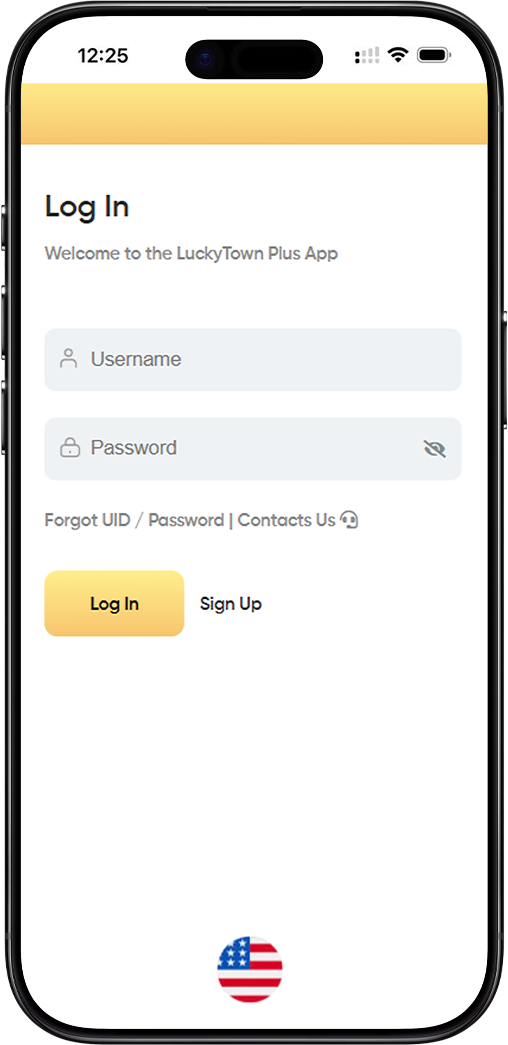
Logging into your LUCKY TOWN PLUS account is designed to be effortless without sacrificing security. Members can access their dashboard quickly by entering only a username and password, making the process convenient for both new and returning users. The interface stays clean and intuitive across desktop and mobile devices, so you can sign in whenever you need access to your LUCKY TOWN account.
Security remains central to the LUCKY TOWN PLUS login experience. Every login attempt is protected by industry-standard encryption to reduce the risk of unauthorized access to your credentials. Whether you are signing in from a personal device or a shared environment, LUCKY TOWN maintains strong security practices to keep your account information protected.
How to Log In to Your LUCKY TOWN PLUS Account
Step 1: Navigate to the LUCKY TOWN PLUS Login Page
Start by visiting the official LUCKY TOWN PLUS login page. Once it loads, you will see the "Welcome to the LuckyTown Plus App" message, confirming that you are on the correct page. This login page acts as the secure entry point to your LUCKY TOWN account and gives you confidence that you are signing in through the intended platform flow.
Step 2: Enter Your Username
In the first field, enter the username you created during your LUCKY TOWN PLUS registration. This username is the unique identifier for your LUCKY TOWN account, so it must match the original registration details exactly. Make sure you use the same letters and numbers you registered with before moving to the password field.
Step 3: Enter Your Password
Next, enter your password in the designated password field. Your LUCKY TOWN PLUS password was created during registration and should follow the platform security requirements, including a minimum of 8 characters. Because passwords are case-sensitive, confirm that your keyboard input is correct before submitting. The field remains masked while you type to help keep your credentials private.
Step 4: Click Log In to Access Your Account
After entering both username and password, click the "Log In" button to access your LUCKY TOWN PLUS account. The system will verify your credentials and, if they are correct, take you directly to your dashboard. If something does not match, the platform will ask you to review the details and try again.
Need Help Accessing Your LUCKY TOWN PLUS Account?
Forgot UID or Password?
If you cannot remember your username or password, LUCKY TOWN PLUS provides a direct recovery path through the "Forgot UID / Password" option below the login form. The recovery flow will typically ask you to verify your registered mobile number or email address before allowing changes to your login details. This keeps account recovery practical while still protecting the identity tied to your LUCKY TOWN account.
Contact Support for Assistance
If self-service recovery does not solve the issue, use the "Contacts Us" option to reach customer support. This is the right path for login errors, account lock situations, or technical issues that prevent normal access. The support team is there to help you recover access to your LUCKY TOWN account without unnecessary delay.
New to LUCKY TOWN PLUS? Sign Up Today
Create Your LUCKY TOWN Account
If you do not have an account yet, use the "Sign Up" option on the login page to begin registration. Creating a LUCKY TOWN PLUS account is straightforward and includes username verification, password setup, and mobile OTP binding so your account is protected from the start. Joining LUCKY TOWN PLUS gives you access to a platform built around reliable and secure member access.
Frequently Asked Questions About LUCKY TOWN PLUS Login
What should I do if I keep getting an "invalid credentials" message?
If you keep seeing an "invalid credentials" message, first check your username and password carefully for typing mistakes. Usernames should match your original registration details, and passwords are case-sensitive. If everything looks correct and you still cannot sign in, use the "Forgot UID / Password" recovery option to reset your login details securely.
Can I stay logged in to my LUCKY TOWN PLUS account?
LUCKY TOWN PLUS allows members to stay signed in on trusted personal devices for convenience. Even so, it is safer to log out after each session when using shared or public devices. This simple habit helps prevent someone else from accessing your LUCKY TOWN account after you leave the device unattended.
Is my LUCKY TOWN PLUS login information secure?
Yes. LUCKY TOWN PLUS protects login data through encrypted connections and strict access controls designed to reduce the risk of interception or misuse. Regular security practices across the platform help ensure that your LUCKY TOWN account remains protected whenever you log in.
Best Practices for a Secure LUCKY TOWN PLUS Login
Protecting your LUCKY TOWN account starts with strong login habits. Use a unique password, avoid saving it on shared devices, and never disclose your credentials to anyone. LUCKY TOWN PLUS will not ask for your password through unsolicited messages, phone calls, or email. If you notice suspicious activity, contact support immediately so your account can be secured without delay.
Start Your LUCKY TOWN PLUS Experience Now
Logging in is the first step toward using a platform built around security, reliability, and user convenience. Whether you are a returning member or someone who recently completed registration, LUCKY TOWN PLUS keeps the sign-in process direct, fast, and secure so you can access your dashboard with confidence.
If you have not joined yet, the "Sign Up" option on the login page makes it easy to enter the LUCKY TOWN PLUS community. The login page at https://luckytownplus.biz/login remains the gateway for secure member access, account recovery, and support when needed.
Ready to Access Your LUCKY TOWN PLUS Account?
Log in now to securely access your LUCKY TOWN account. If you need help, use the Forgot UID / Password recovery path or contact support for assistance. New members can register through the platform and begin their LUCKY TOWN PLUS journey with a protected account.
Log In to LUCKY TOWN PLUS Now