
DuitNow Deposit at LUCKYTOWN PLUS - Complete Guide
Why Use DuitNow for Deposits at LUCKYTOWN PLUS?

Introduction to LUCKY TOWN PLUS Duit Now Topup
The LUCKY TOWN PLUS Duit Now topup feature provides a fast and convenient way for members to add funds using Malaysia's national QR payment standard. With UPay and Go Pay options, you can complete deposits by scanning QR codes directly from your preferred payment app. This guide covers the full flow, from opening the deposit menu to scanning the QR code and waiting for system processing.
UPay Duit Now Topup: Step-by-Step Guide

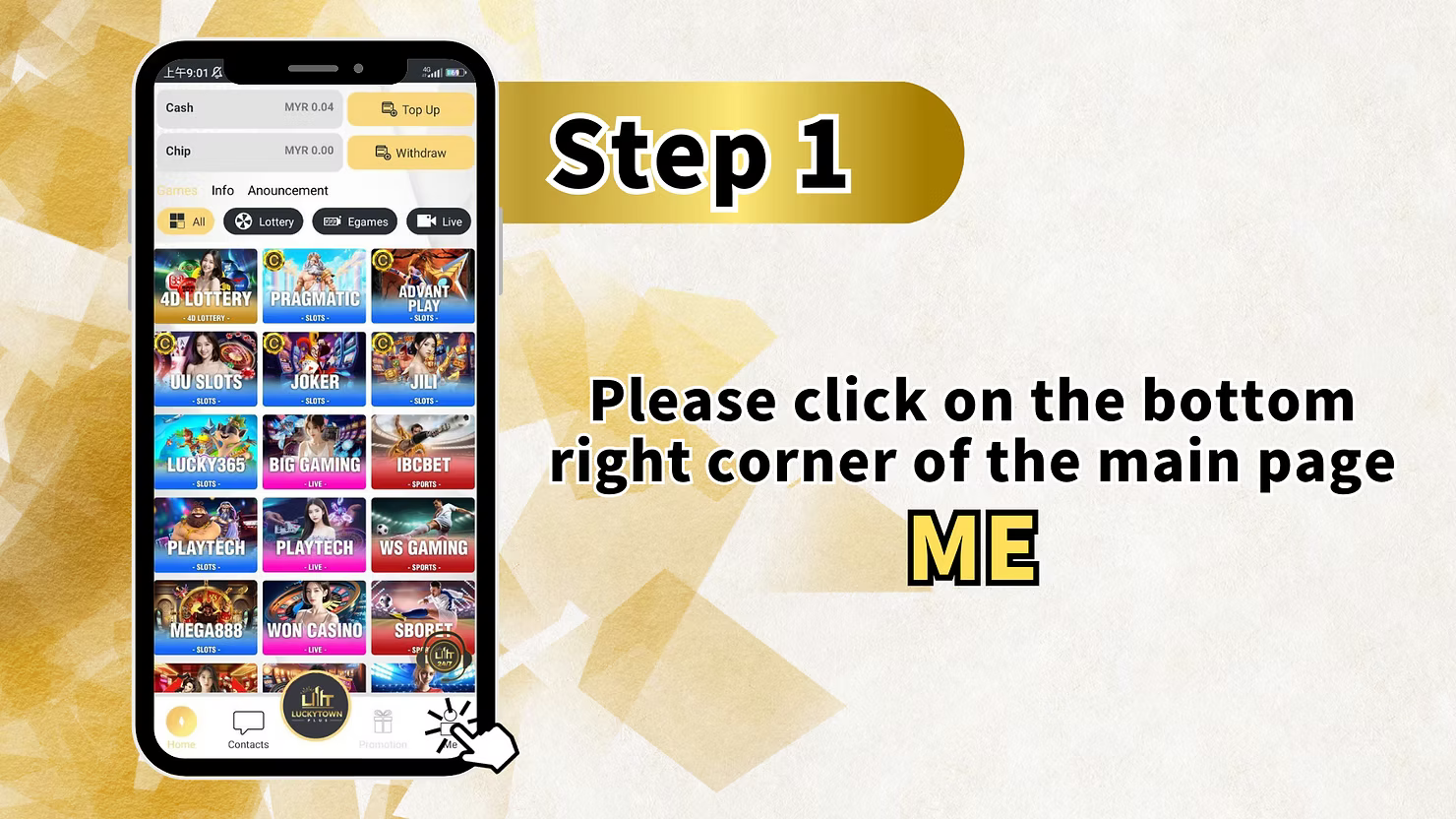
Step 1: Access the Main Menu via the ME Icon
Log in to your account and tap the ME icon at the bottom right of the dashboard. This opens your account hub, where you can view balances, games, info updates, and announcements.
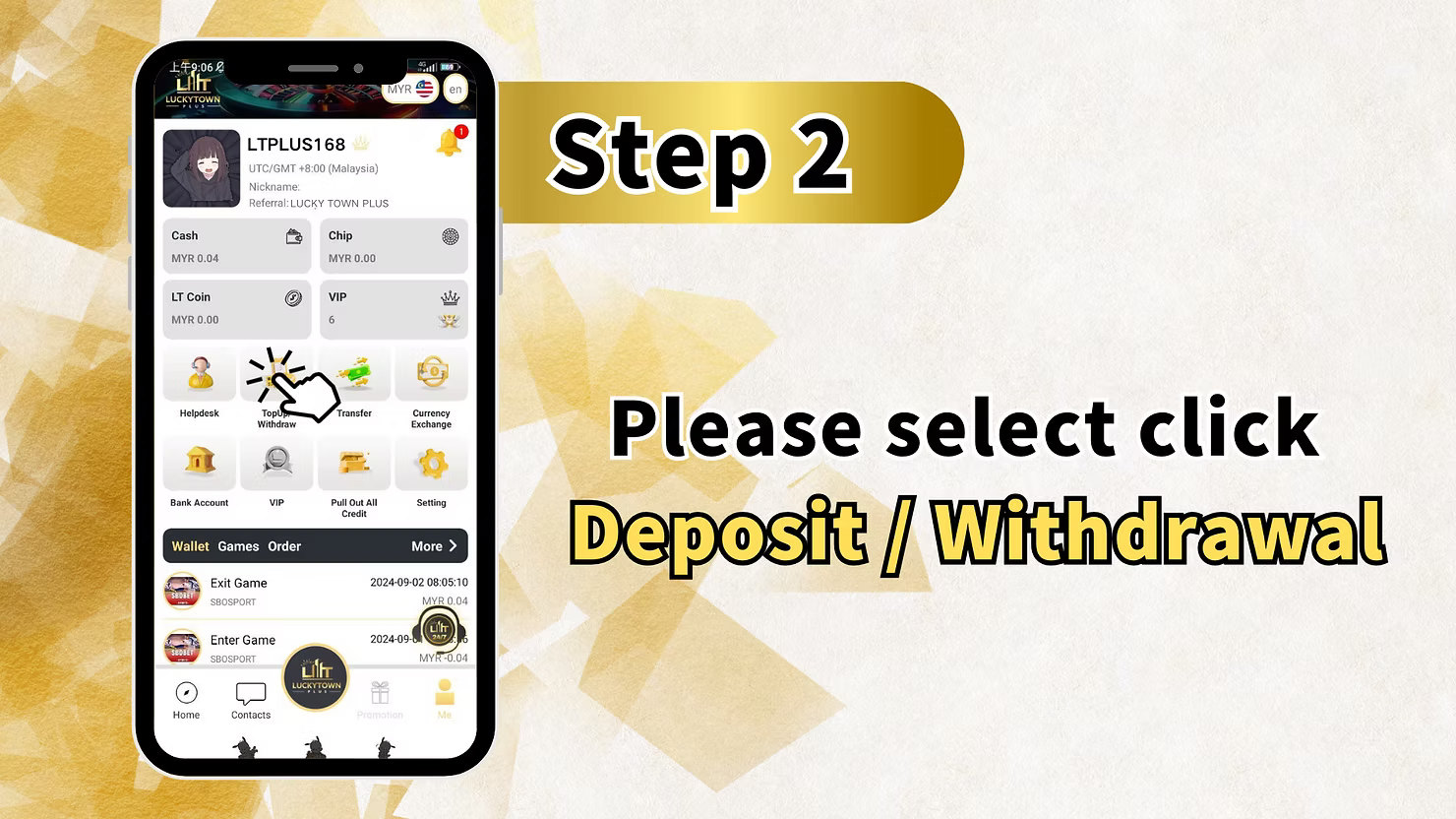
Step 2: Enter the Deposit & Withdrawal Section
Inside the ME section, select Deposit / Withdrawal to continue. This is your main control center for all incoming and outgoing transactions.
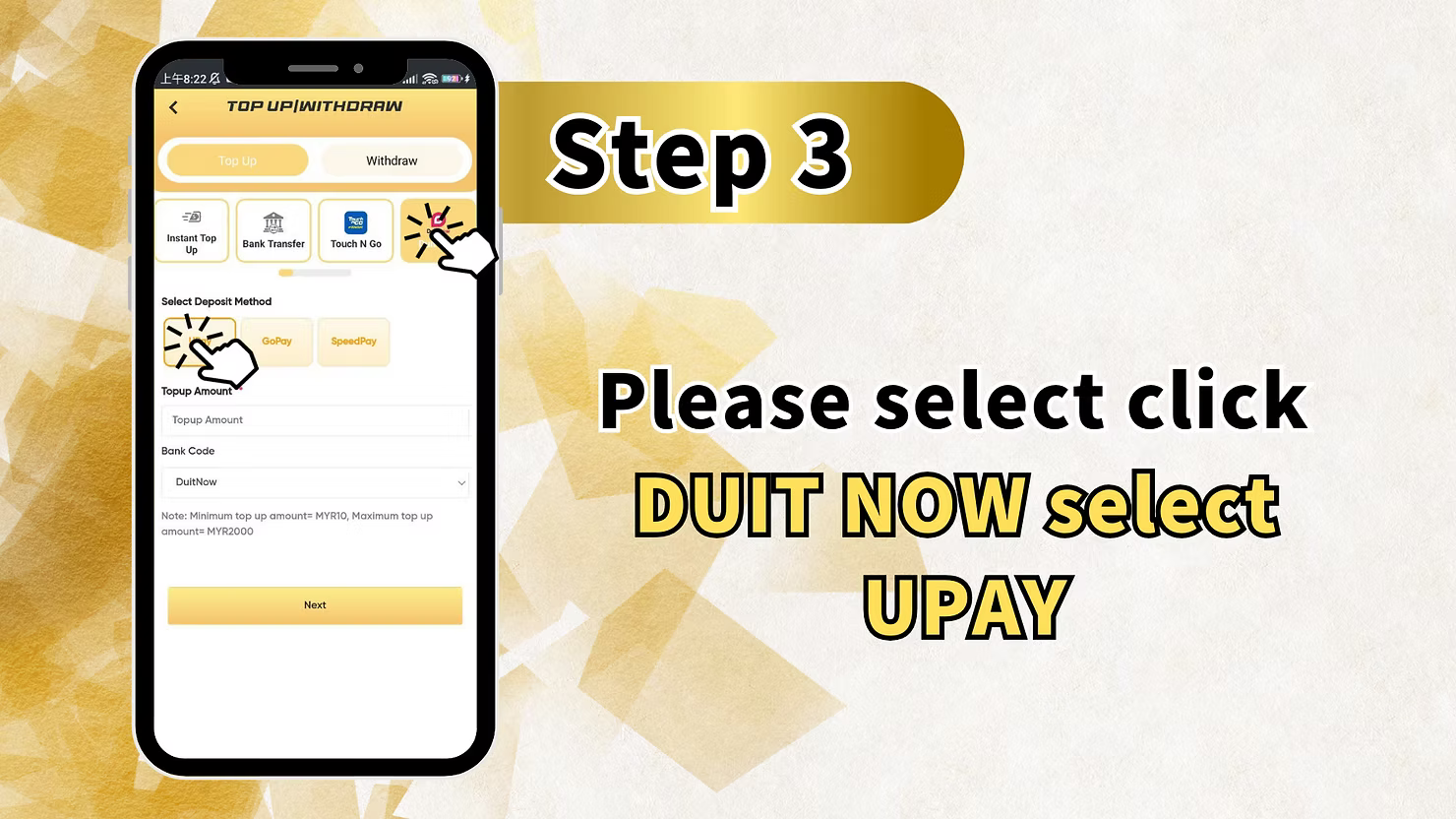
Step 3: Select DUIT NOW and Choose UPay
From the available deposit methods, choose DUIT NOW and then select UPAY as the payment provider. This will take you into the DuitNow QR flow through UPay.
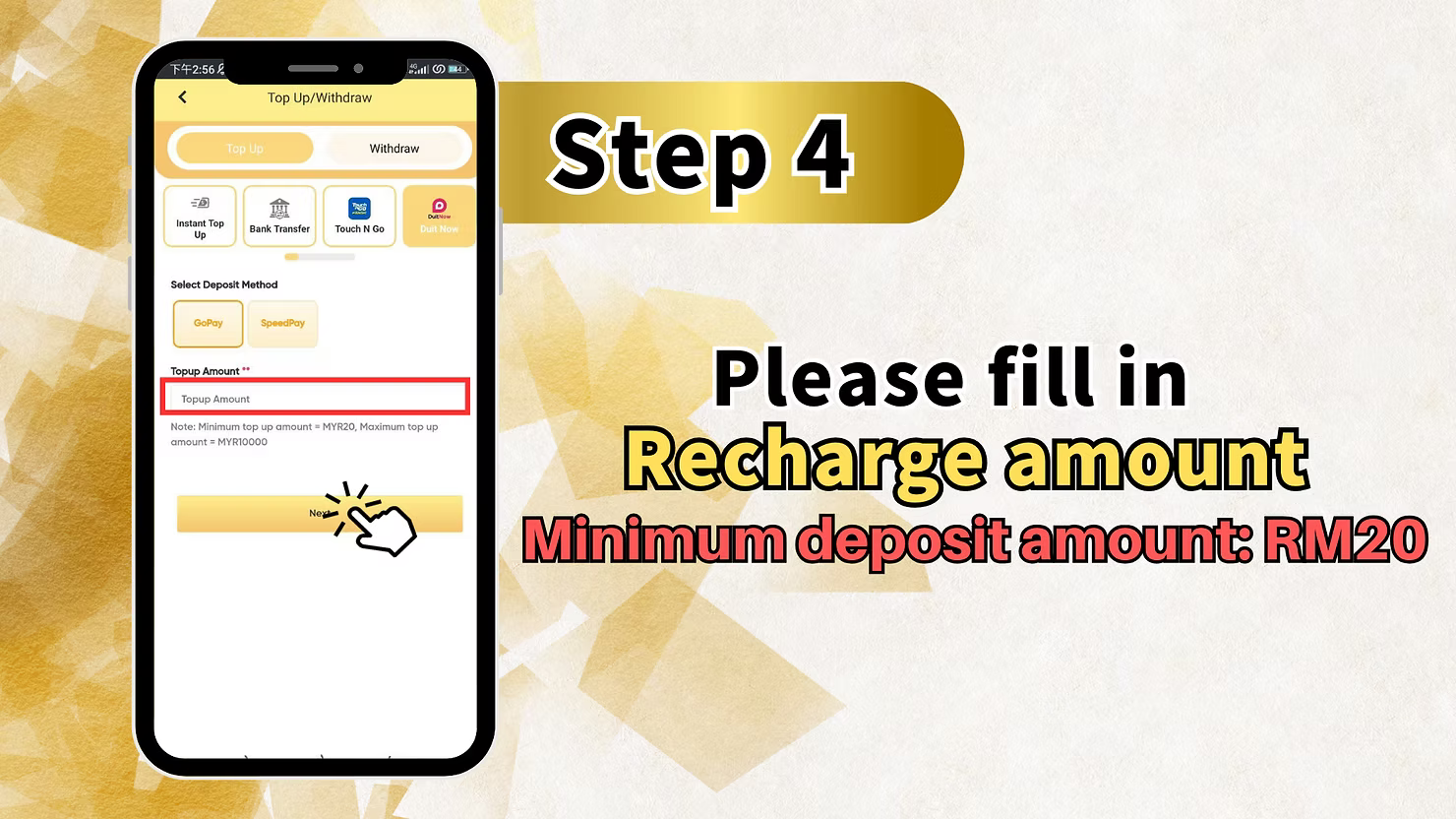
Step 4: Enter Recharge Amount
Enter the amount you want to deposit. The minimum amount for UPay is RM10. After entering the amount, select Recharge and verify the figure carefully before continuing.
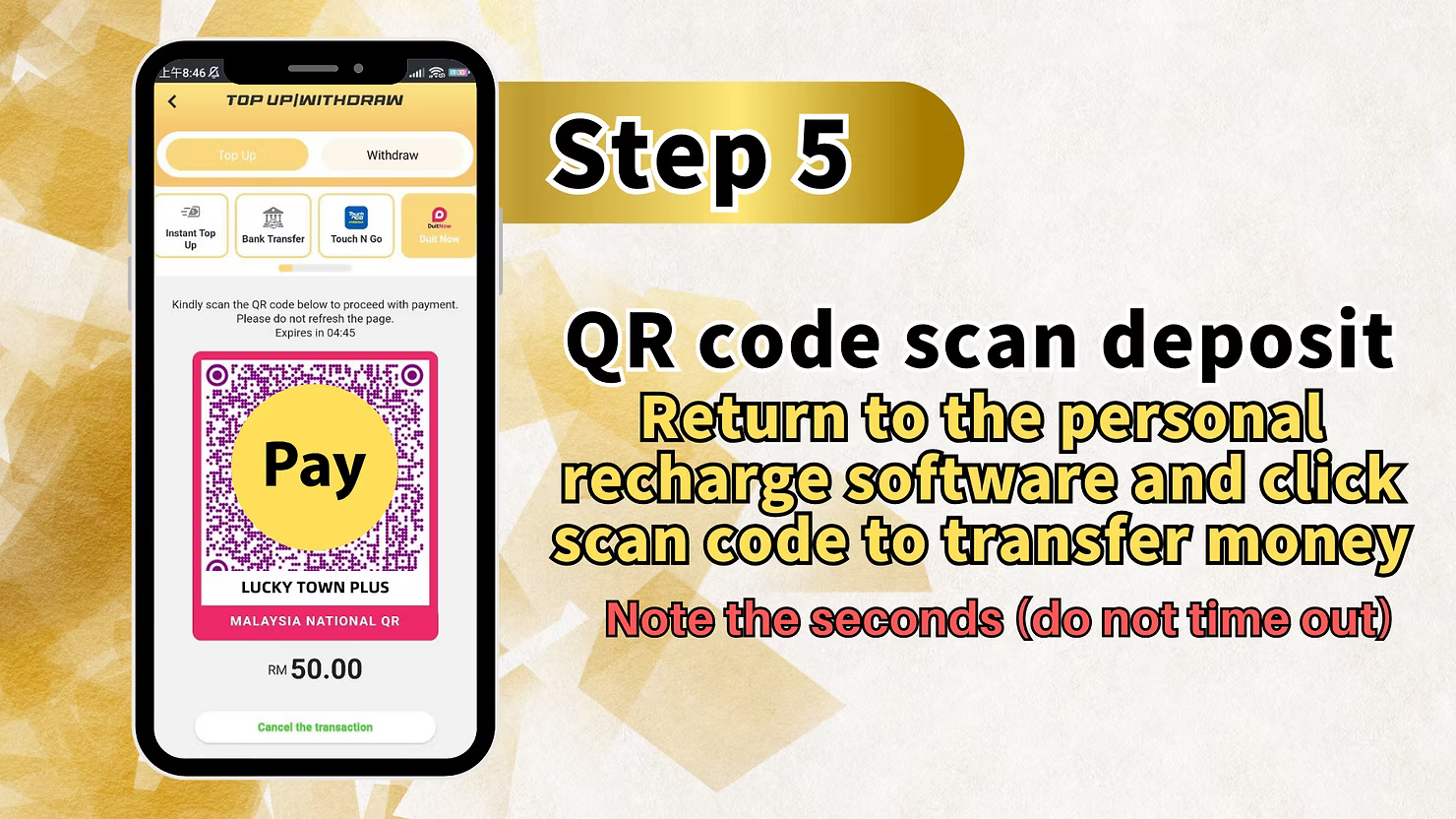
Step 5: QR Code Scan Deposit
The system will generate a Malaysia National QR code for your payment. Open your UPay app, use the scan function, and complete the payment before the countdown timer expires. The platform does not recommend using shopping apps for deposits.
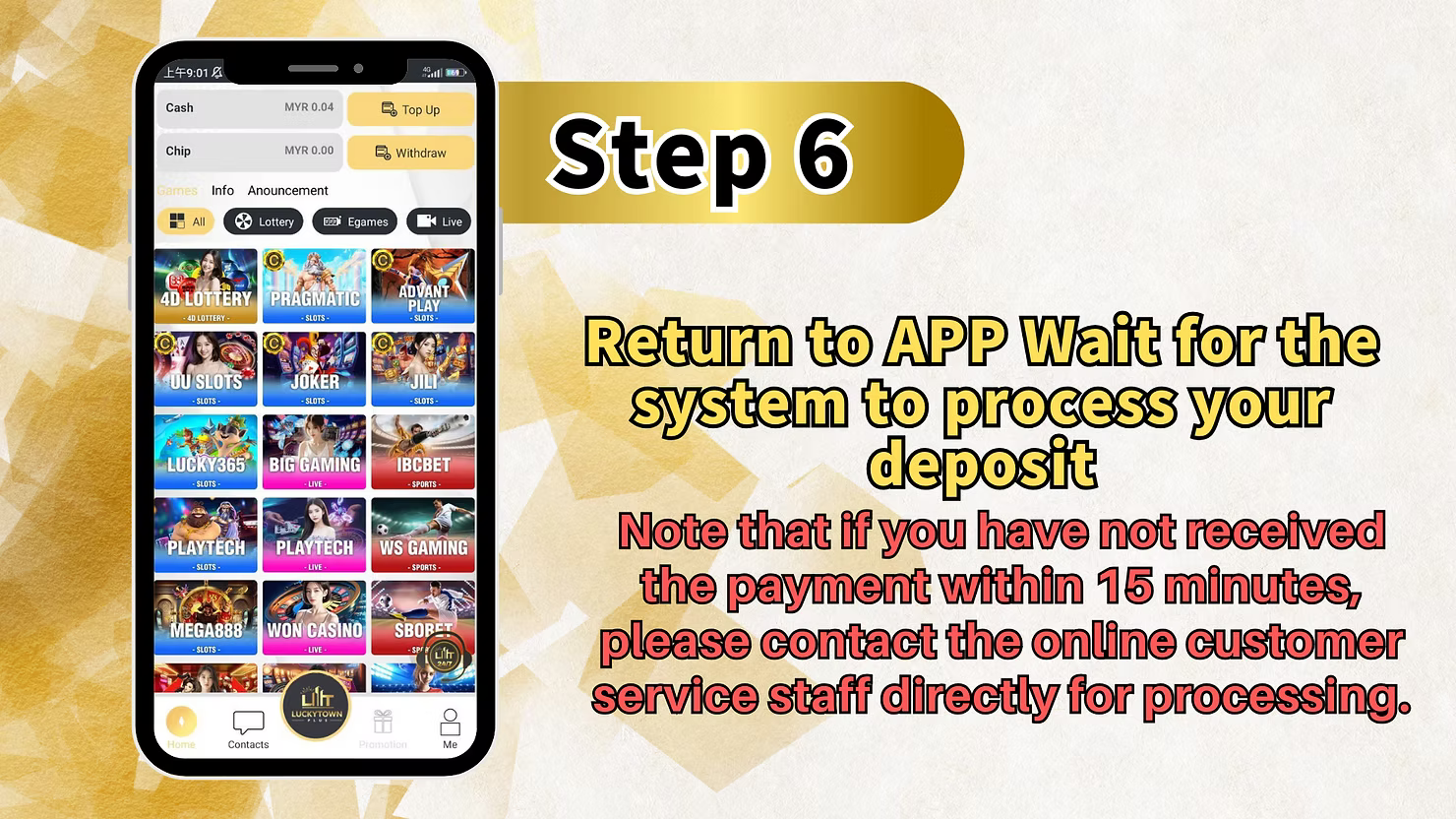
Step 6: Return to App and Wait for System Processing
After completing payment in UPay, return to the LUCKY TOWN PLUS app and wait for processing. If you do not receive payment confirmation within 15 minutes, contact online customer service directly for assistance.
Go Pay Duit Now Topup: Step-by-Step Guide

Step 1: Access the Main Menu via the ME Icon
Log in and tap the ME icon at the bottom right corner of the main page. This opens the account hub where deposit and withdrawal options are available.
Step 2: Enter the Deposit & Withdrawal Section
Select Deposit / Withdrawal from the ME section to open the transaction center for deposits.
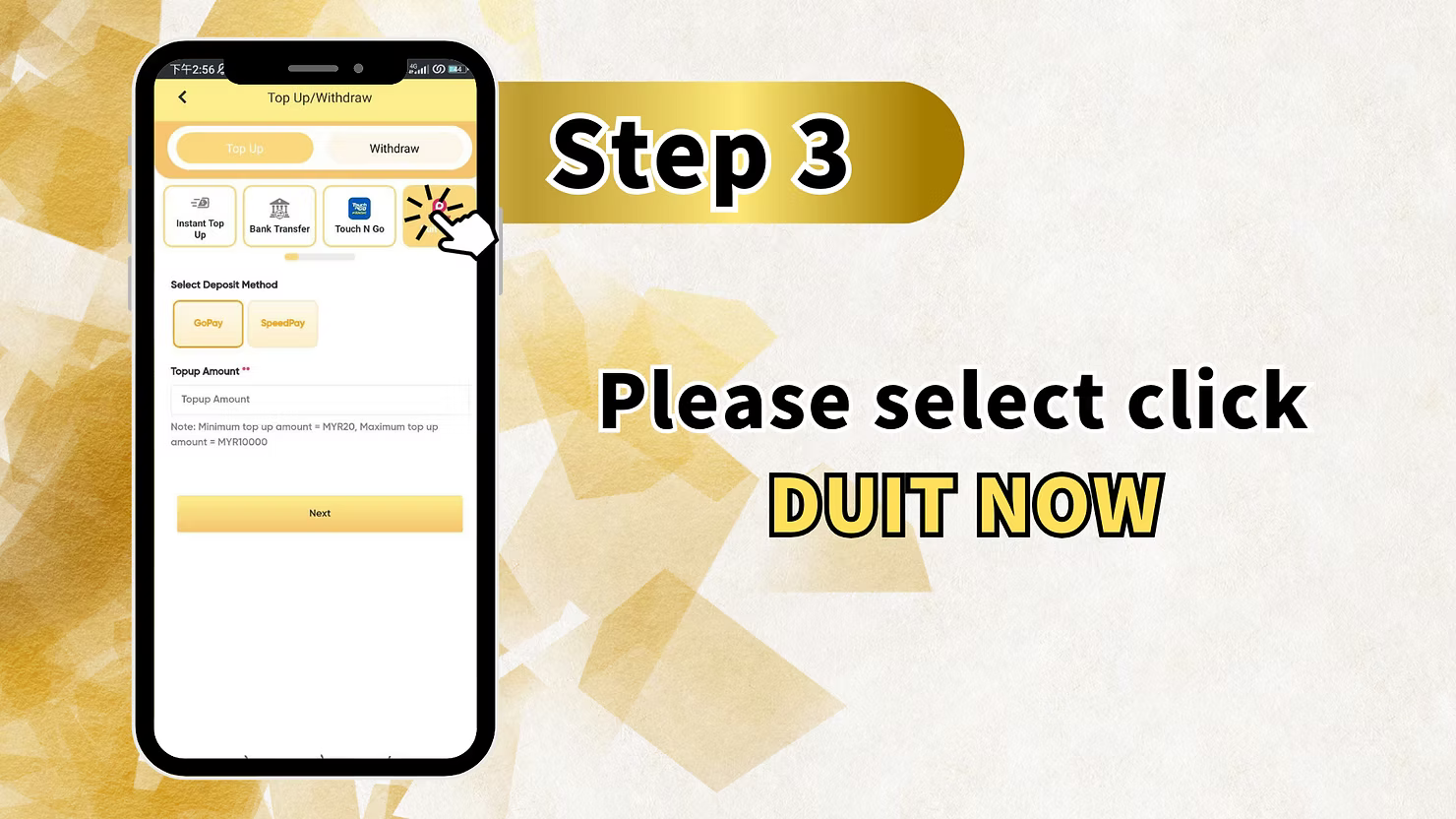
Step 3: Select BUY NOW for Go Pay
From the available deposit methods, choose BUY NOW to access the Go Pay flow for your Duit Now topup.
Step 4: Enter Receipt Amount
Enter the amount you want to deposit. The minimum amount for Go Pay is RM20. Double-check the amount before continuing to QR generation.
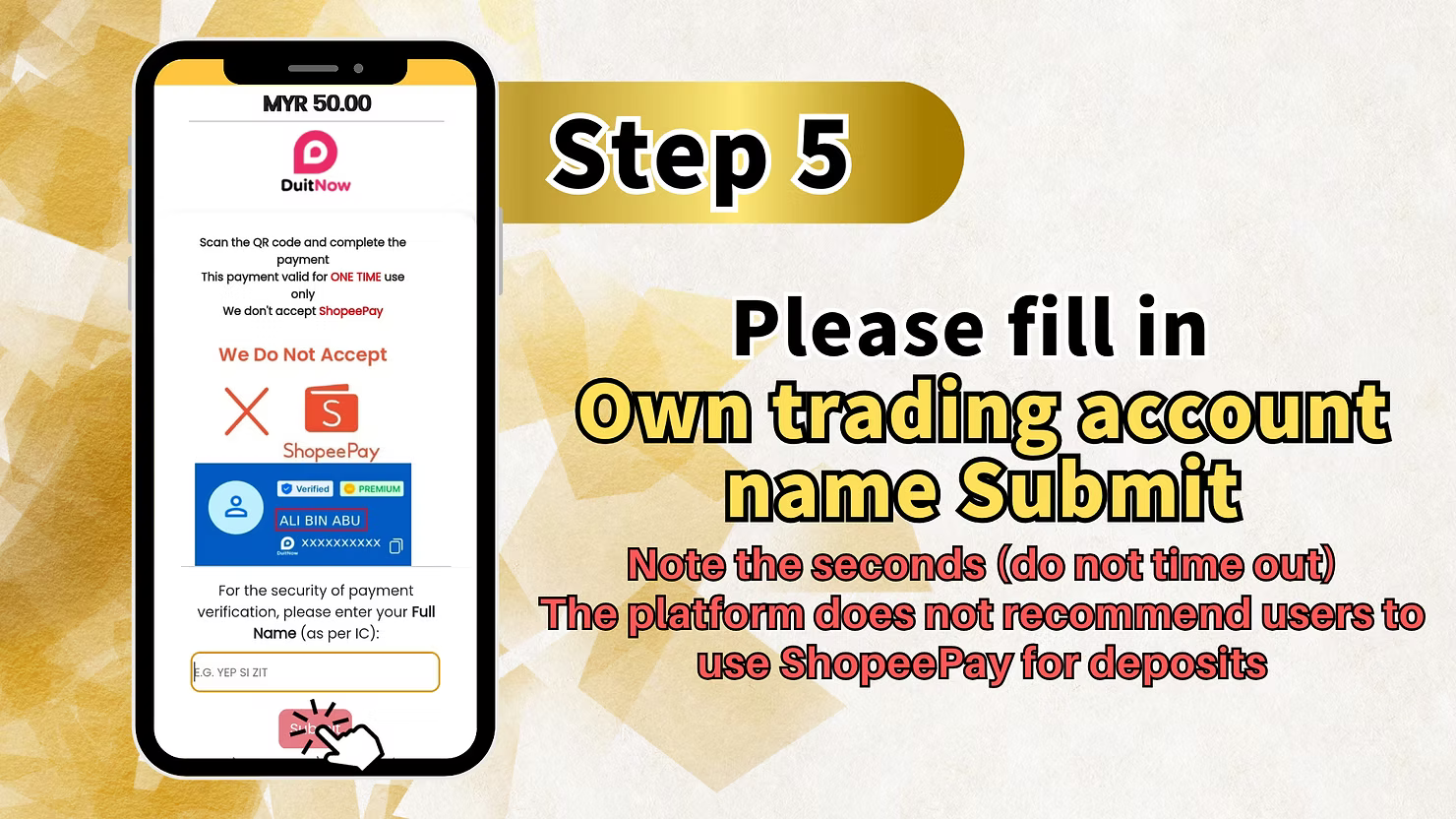
Step 5: Fill in Trading Account Name and Submit
Enter your own trading account name and submit it before proceeding. Watch the countdown timer and complete this step before timeout. The platform also does not recommend using shopping apps for deposits here.
Step 6: QR Code Scan Deposit
The system will generate a QR code for your payment. Open your Go Pay app, select the scan function, and complete the payment before the timer expires.
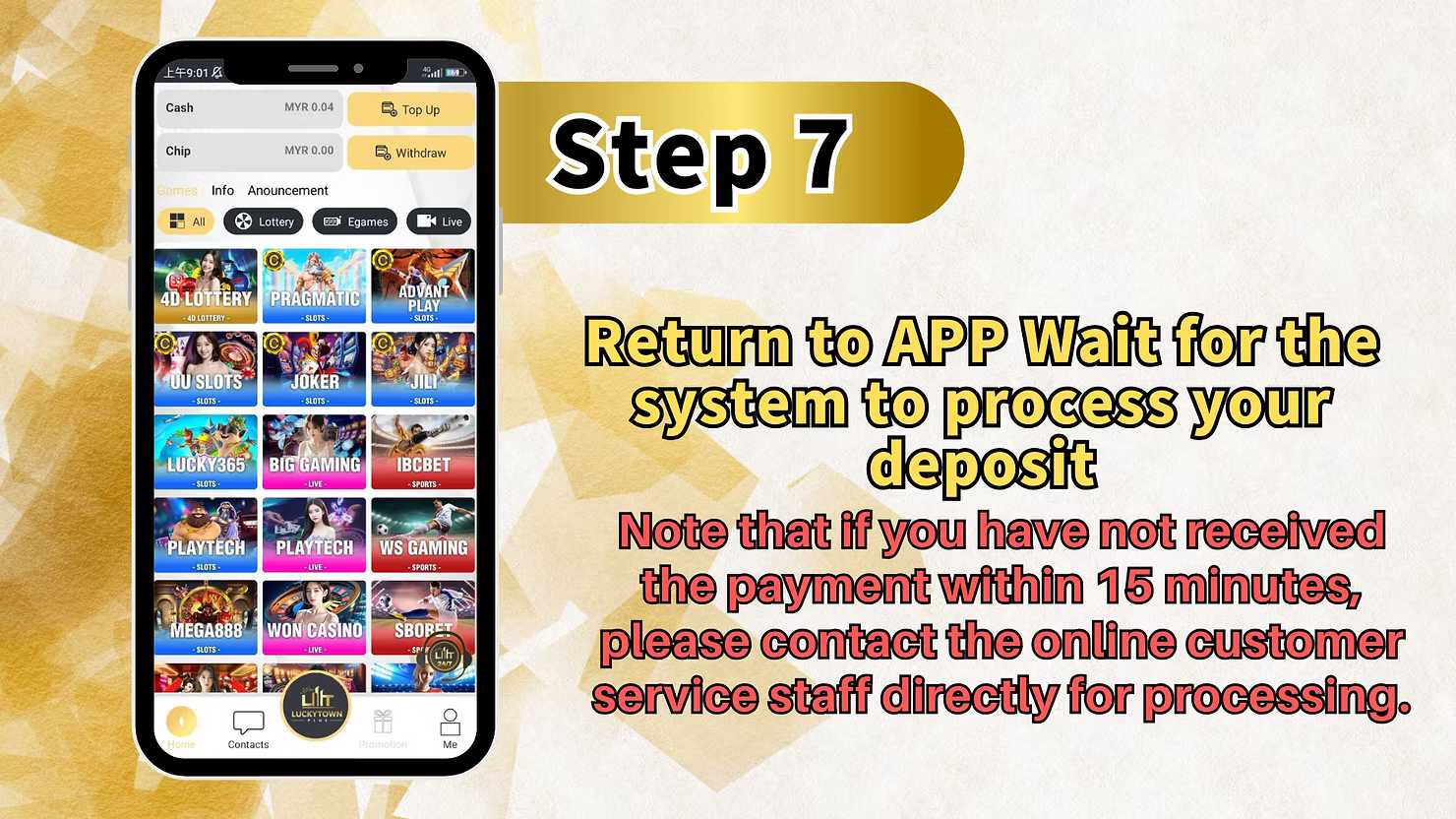
Step 7: Return to App and Wait for System Processing
After the payment is completed in Go Pay, return to the LUCKY TOWN PLUS app and wait for system processing. If no confirmation arrives within 15 minutes, contact online customer service directly.
Important Guidelines for LUCKY TOWN PLUS Duit Now Topup
Minimum Deposit Amounts
UPay supports a minimum deposit of RM10, while Go Pay starts from RM20. Choose the option that best matches your preferred payment app and budget.
QR Code Timeout Warning
Watch the QR code countdown timer closely and complete the scan before it expires. If the timer runs out, you will need to generate a new transaction.
15-Minute Processing Guideline
After scanning and paying, return to the app and wait for processing. If you do not receive confirmation within 15 minutes, contact customer service immediately.
Malaysia National QR Standard
This topup method uses Malaysia's National QR standard, providing compatibility with major DuitNow-enabled payment apps including UPay and Go Pay.
Shopping Deposit Restriction
The platform does not recommend using shopping apps for deposits. Use only the designated payment methods for smoother verification and crediting.
Frequently Asked Questions About LUCKY TOWN PLUS Duit Now Topup
What is the minimum deposit for UPay Duit Now?
The minimum deposit for UPay is RM10, making it one of the most accessible deposit methods on the platform.
What is the minimum deposit for Go Pay Duit Now?
The minimum deposit for Go Pay is RM20. This applies to Go Pay QR transactions on the platform.
How do I start a Duit Now topup?
Tap ME, enter Deposit / Withdrawal, then choose DUIT NOW for UPay or BUY NOW for Go Pay depending on your preferred provider.
What if my QR code expires before I scan?
If the QR code expires, generate a new transaction and complete the next scan promptly before the timer runs out.
How long does processing take after QR scan?
Most deposits process quickly, but if there is no confirmation within 15 minutes, contact customer service for help.
Can I use shopping apps for Duit Now deposit?
No. The platform does not recommend using shopping apps for deposits. Use only the intended payment apps such as UPay and Go Pay.
What information do I need to submit for Go Pay?
For Go Pay, you need to fill in your own trading account name before scanning the QR code and completing payment.
Why Choose LUCKY TOWN PLUS Duit Now Topup
Malaysia's National QR Standard
Duit Now topup uses Malaysia's official National QR system, giving members a familiar and reliable QR payment experience.
Ultra-Low Minimum Deposit with UPay
The RM10 UPay minimum provides a low entry point for members who prefer smaller first deposits.
Fast QR Code Processing
The QR payment flow supports quick confirmation, with a 15-minute escalation guideline for customer support if needed.
Multiple Provider Options
Members can choose between UPay and Go Pay depending on which payment app they already use and which minimum deposit suits them.
Clear Step-by-Step Instructions
The structured teaching guide helps first-time users complete the deposit flow with less confusion and fewer mistakes.
Start Your LUCKY TOWN PLUS Duit Now Topup Today
Use UPay with a RM10 minimum or Go Pay with a RM20 minimum for fast QR code deposits. Follow the teaching guide, scan the Malaysia National QR code, and complete your payment with processing normally handled within 15 minutes.
Start Duit Now Topup Now