
Change Password at LUCKYTOWN PLUS - Complete Guide
Why Keep Your Password Updated at LUCKYTOWN PLUS?


Introduction to LUCKY TOWN PLUS Change Password and Account Recovery
LUCKY TOWN PLUS provides a complete account recovery flow for members who need to change their password, reset a forgotten password, or retrieve a forgotten username. Whether you are already logged in or locked out of your account, the platform uses your registered phone number and OTP verification to protect account access. This guide explains each available recovery path so you can restore access quickly and securely.
Method 1: LUCKY TOWN PLUS Change Password While Logged In
Step 1: Access the ME Icon
Log in to your LUCKY TOWN PLUS account and tap the ME icon at the bottom right corner of the main page. This opens your personal account center.
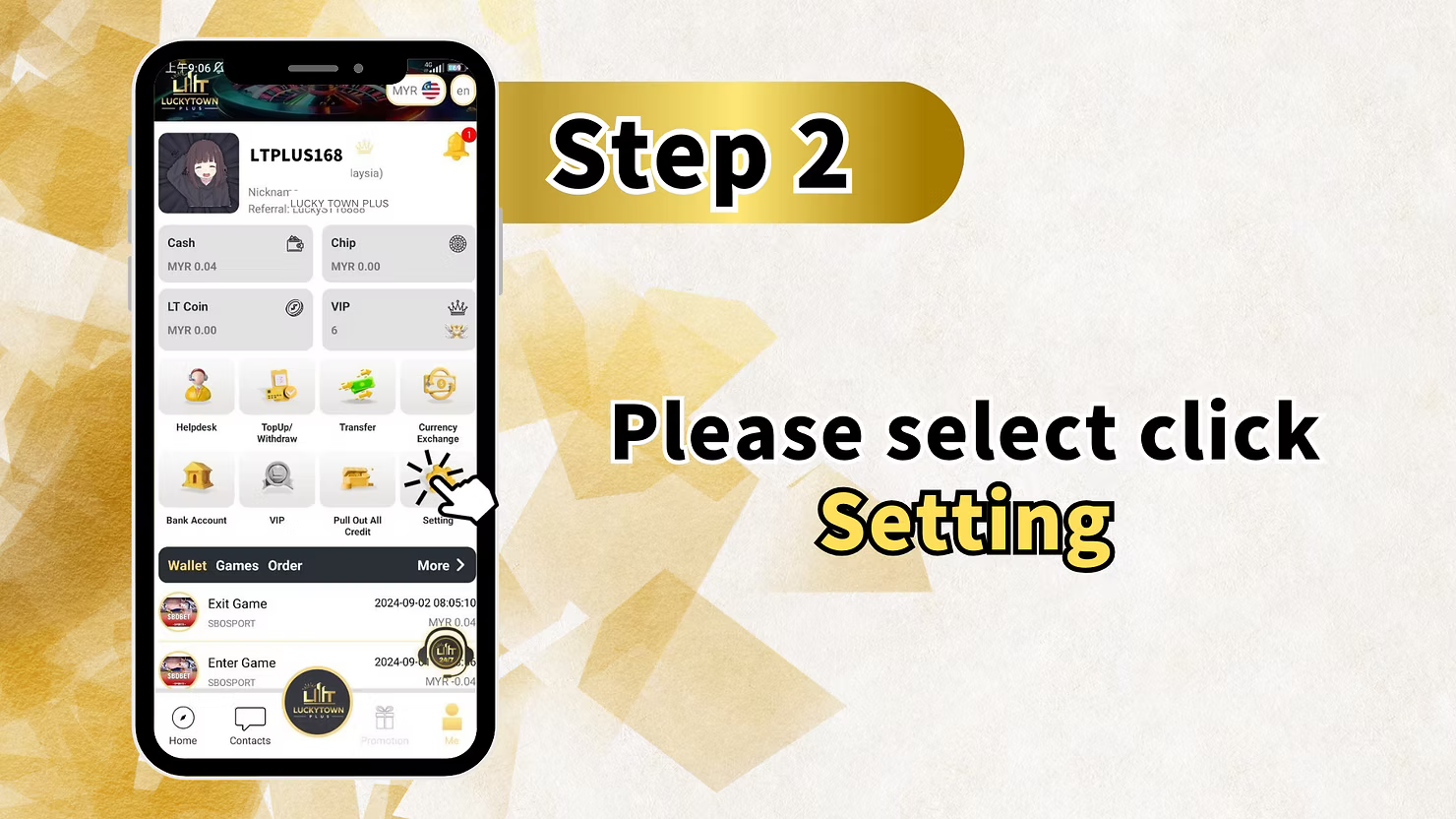
Step 2: Select Settings
Inside the account center, locate the Settings menu. This is where you manage your account preferences and security options.
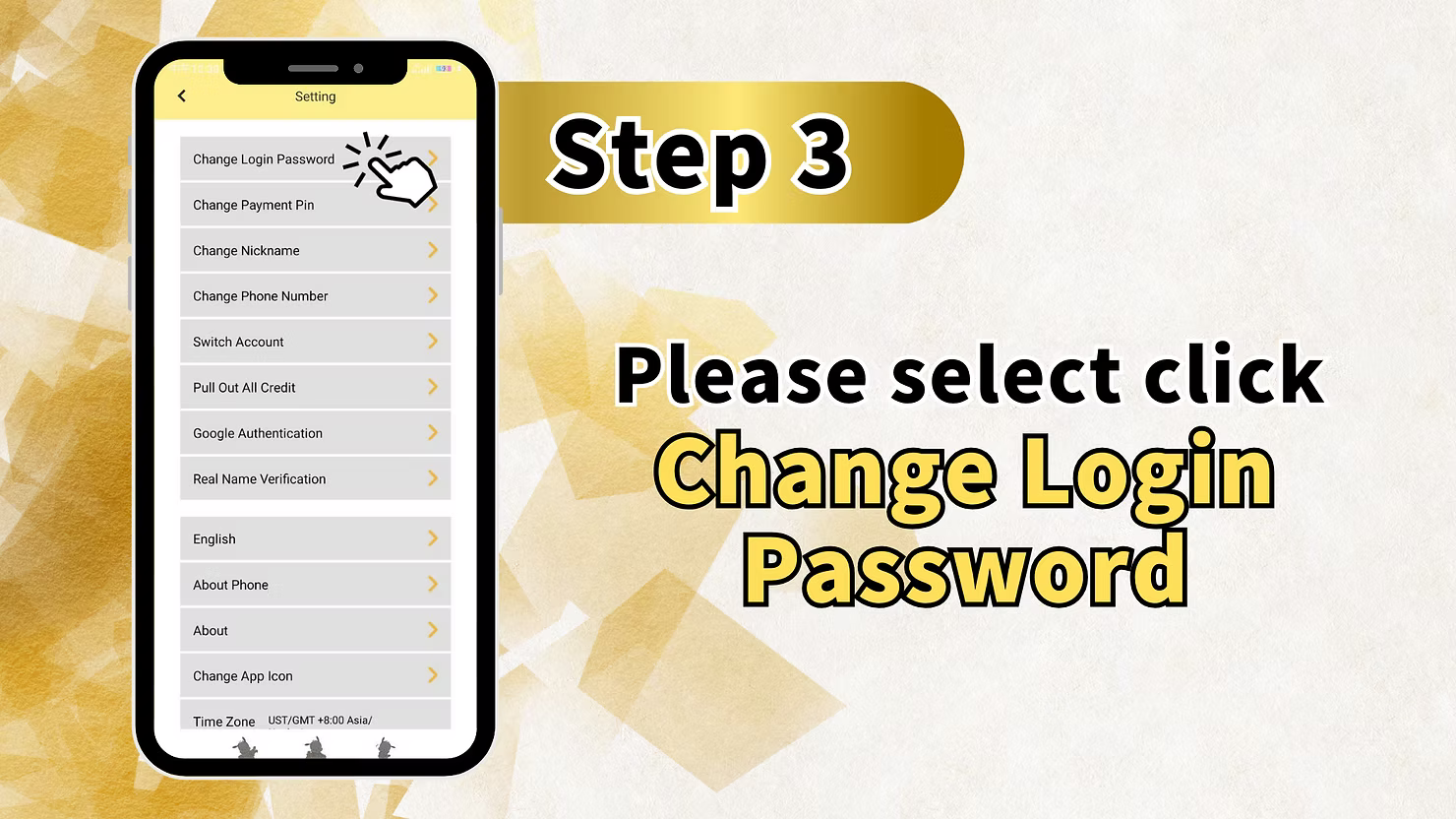
Step 3: Choose Change Login Password
Tap Change Login Password to open the password update form. This option is used when you still know your current password and want to replace it with a new one.
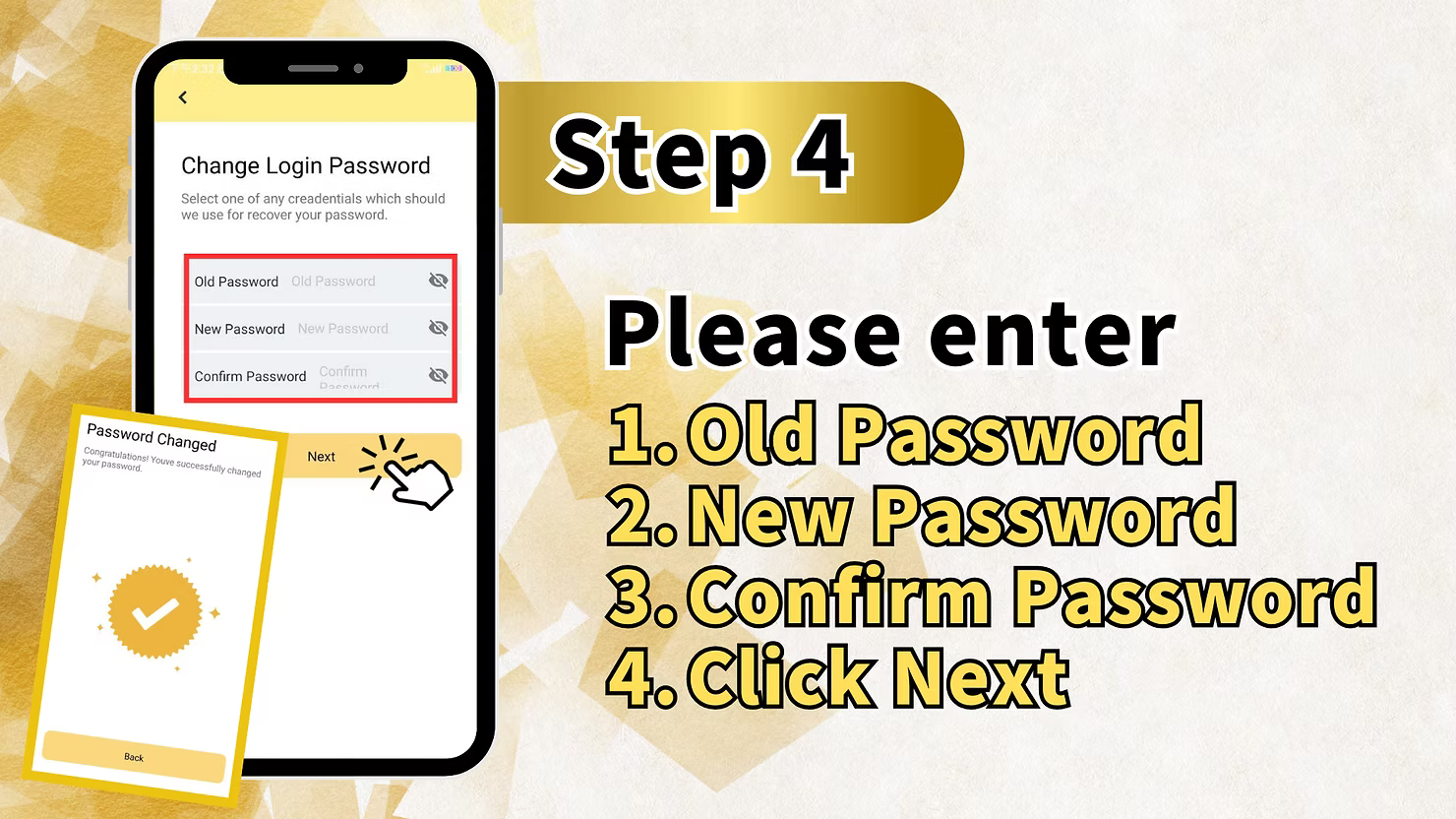
Step 4: Enter Your Old and New Password
Fill in your current password first, then enter your new password and confirm it in the final field. Make sure the new password matches exactly in both entries before continuing.
Step 5: Confirm the Password Change
Tap Next to submit the request. Once accepted, your LUCKY TOWN PLUS login password is updated immediately and your account remains protected under the new credentials.
Method 2: LUCKY TOWN PLUS Forgot Password Recovery (Not Logged In)
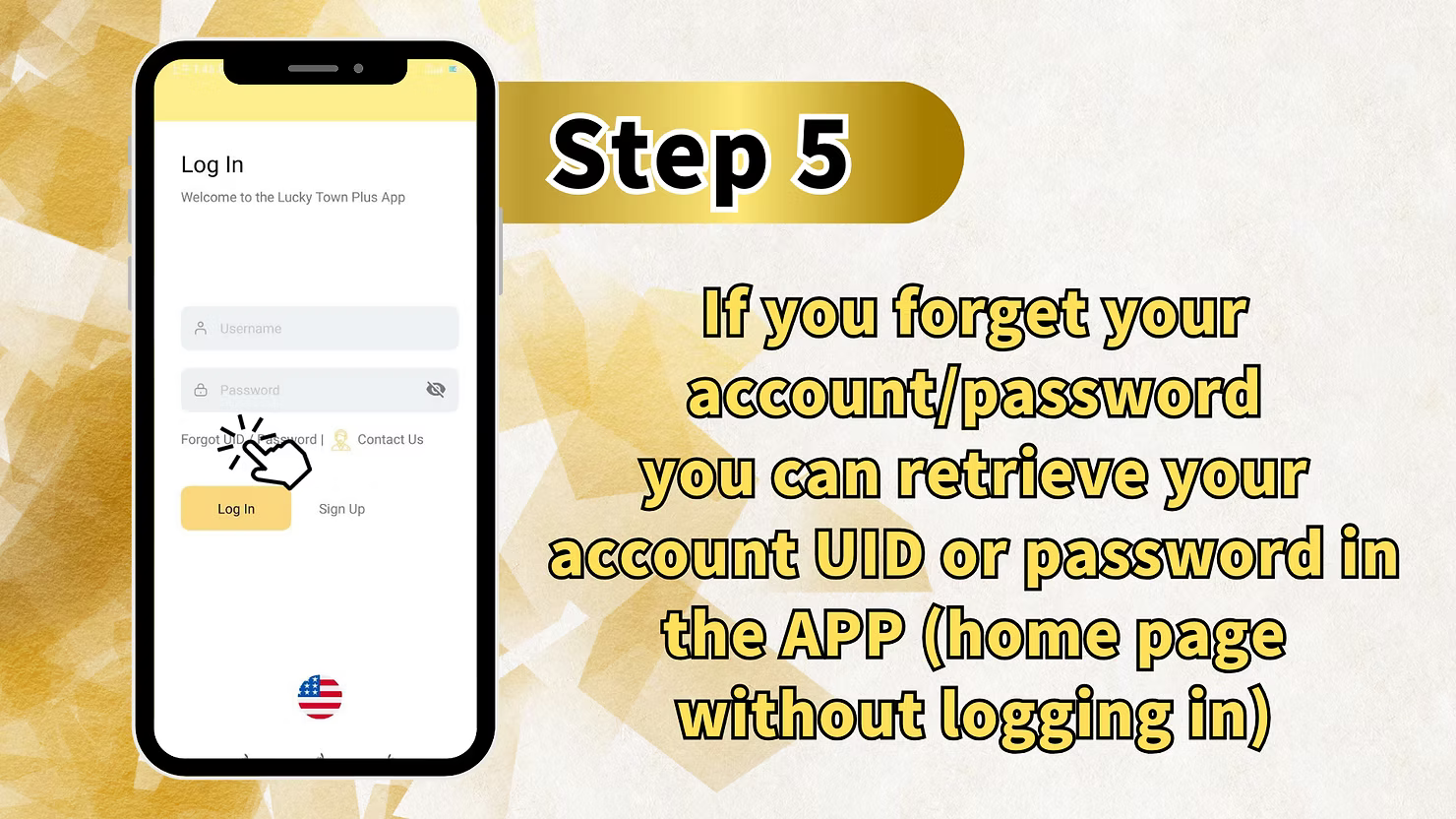
Step 1: Access the Login Page Recovery Options
If you cannot sign in, start from the login page and look for the Forgot UID / Password recovery entry. This section is designed for members who no longer remember their login details.
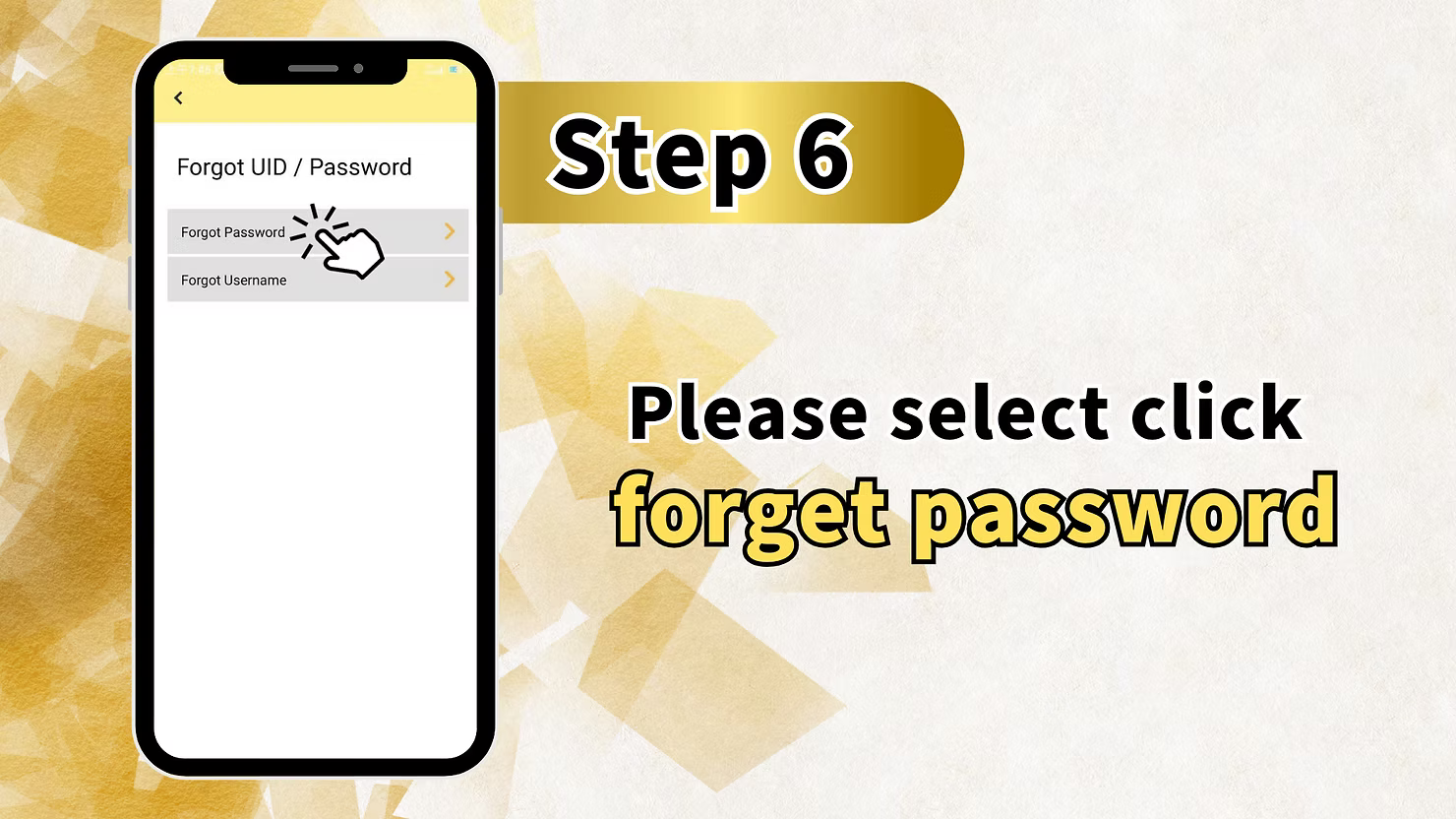
Step 2: Select Forgot Password
Choose the Forgot Password option to begin the password recovery process. The system will move you to the verification page for resetting login access.
Step 3: Enter Your Registered Phone Number
Key in the phone number linked to your LUCKY TOWN PLUS account. The registered number is required because account recovery is tied to OTP verification.
Step 4: Get OTP and Enter a New Password
Request the OTP code, enter the code you receive on your registered phone, then fill in your new password and confirm it. This proves account ownership before the reset is completed.
Step 5: Click Next to Complete the Reset
Tap Next after all required details are entered. The platform will complete your LUCKY TOWN PLUS forgot password reset and restore access with the new password.
Method 3: LUCKY TOWN PLUS Forgot Username Recovery
Step 1: Access the Login Page and Select Forgot UID / Password
Begin from the login screen and open the Forgot UID / Password recovery area. This is the entry point for both forgotten password and forgotten username assistance.
Step 2: Select Forgot Username
Choose Forgot Username to continue with username retrieval. This option is intended for members who remember their phone number but no longer remember their account ID.
Step 3: Enter Your Registered Phone Number for Username Recovery
Provide the phone number used during registration. The platform uses this number to locate the account record connected to your membership.
Step 4: Get OTP for Username Recovery
Request the OTP code and enter it on the recovery screen. OTP verification confirms that the request is being made by the rightful account holder.
Step 5: Click Next to Retrieve Username
Tap Next to complete the process. LUCKY TOWN PLUS will then display the username connected to your registered phone number so you can sign in again.
Important Guidelines for LUCKY TOWN PLUS Account Recovery
Recovery Options Available
LUCKY TOWN PLUS supports three main account-management paths: password change while logged in, forgot password reset while logged out, and forgot username retrieval through OTP verification.
Phone Number Requirement
Your registered phone number is essential for account recovery. If the number is unavailable, you may need to contact customer service for additional assistance.
OTP Verification Process
OTP is used to secure recovery actions when you are not logged in. Always enter the code promptly and never share it with anyone else.
Password Security Best Practices
Choose a strong password that is easy for you to remember but difficult for others to guess. Update it whenever necessary to keep your LUCKY TOWN PLUS account protected.
Frequently Asked Questions About LUCKY TOWN PLUS Change Password
How do I change my password while logged in?
Log in, open the ME section, enter Settings, choose Change Login Password, and submit your current password together with the new password.
What if I forgot my password and cannot log in?
Use the Forgot Password option from the login page, verify your registered phone number with OTP, and create a new password.
What if I forgot my username?
Use the Forgot Username recovery option, verify your registered phone number with OTP, and the platform will display your username.
How do I get the OTP code?
Tap the OTP request button on the recovery screen. The code will be sent to the phone number registered to your LUCKY TOWN PLUS account.
What if I no longer have access to my registered phone?
You may need to contact customer support because the standard automated recovery flow depends on the registered number.
How long is the OTP valid?
Use the OTP as soon as you receive it because verification codes are typically time-limited for security reasons.
Can I recover my account without OTP?
For logged-out recovery, OTP verification is required. If you are already logged in and know your current password, you can change it without OTP through Settings.
What other account management options are available in Settings?
The Settings area is typically where you manage account security options such as changing your login password and related account preferences.
Why Choose LUCKY TOWN PLUS Account Recovery System
Multiple Recovery Paths
Members can recover access through password change, password reset, or username retrieval depending on their current situation.
Secure OTP Verification
OTP verification helps confirm account ownership before a forgotten password or username request is completed.
Clear Step-by-Step Instructions
The recovery flow is structured to guide members from the login screen or account center through to final confirmation.
24/7 Customer Support Access
If standard recovery does not resolve your issue, customer support remains an additional channel for help.
Centralized Account Management
Both security settings and recovery options are organized within the same LUCKY TOWN PLUS ecosystem, making account management simpler.
Start Managing Your LUCKY TOWN PLUS Account Security Today
Three-Path Recovery System
LUCKY TOWN PLUS gives members a complete recovery structure that covers password change, forgot password reset, and forgot username retrieval.
Path One: Password Change While Logged In
If you are already inside your account, you can update your login password directly through the Settings menu.
Path Two: Forgot Password via OTP
If you are locked out, use the Forgot Password path and verify your registered phone number with OTP before creating a new password.
Path Three: Forgot Username via OTP
If you cannot remember your username, use the dedicated recovery path to retrieve it through registered phone verification.
OTP Security and Customer Support Backup
OTP keeps recovery secure, while support remains available if you need further assistance beyond the standard process.
Gateway to Secure Account Management
Change password while logged in via Settings, or recover forgotten credentials with OTP verification. Multiple recovery paths available. LUCKY TOWN PLUS keeps your account safe and accessible at all times.
Access Account Recovery Now