
Why Use Currency Exchange at LUCKYTOWN PLUS?
Convenient In-App Currency Conversion


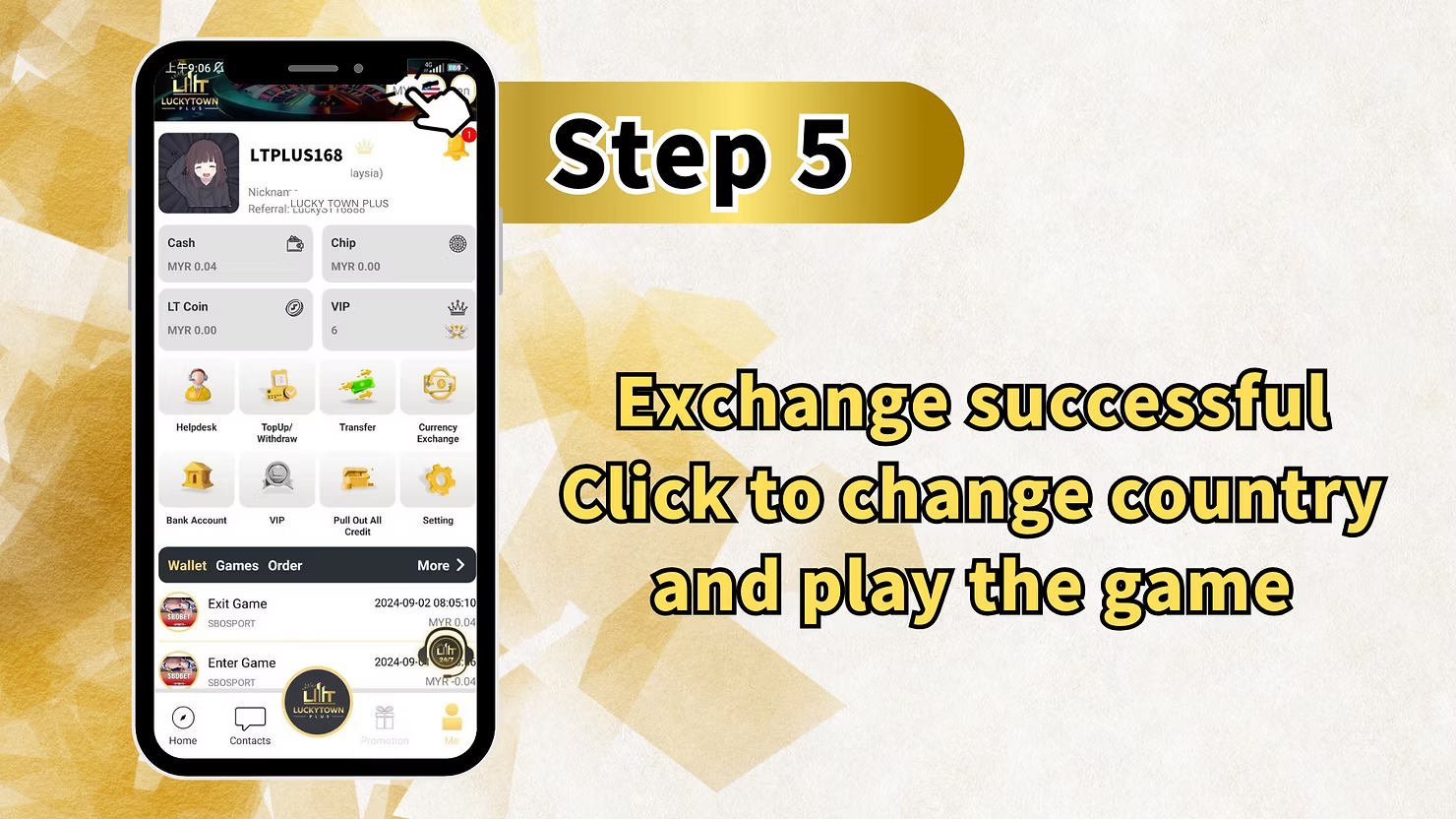
Introduction to LUCKY TOWN PLUS Exchange Currency
The LUCKY TOWN PLUS exchange currency feature allows members to convert between MYR (Malaysian Ringgit) and THB (Thai Baht) directly within the app. Whether you are planning to explore games on different regional platforms or simply need to manage funds across currencies, this tool provides a seamless conversion experience. This guide walks you through every step of the currency exchange process, from accessing the ME menu to confirming your conversion amount. LUCKY TOWN members enjoy transparent exchange rates and simple one-click conversions.
Step-by-Step Guide to LUCKY TOWN PLUS Exchange Currency
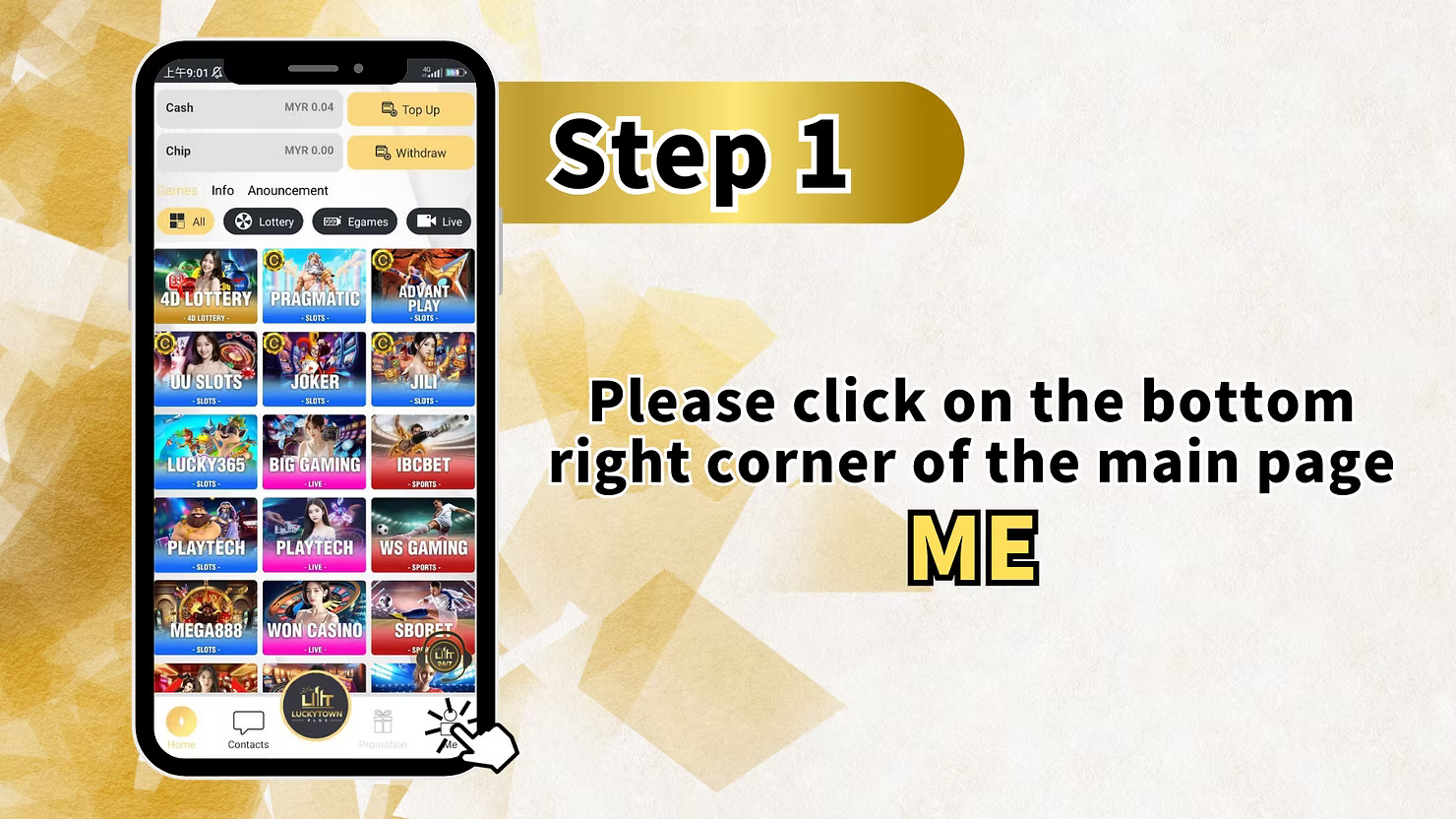
Step 1: Access the Main Menu via the ME Icon
To begin your LUCKY TOWN PLUS exchange currency process, log in to your account and locate the ME icon positioned at the bottom right corner of the main dashboard. Tapping this opens your personal account hub, where you can view balances, games, updates, announcements, and financial tools including currency exchange.
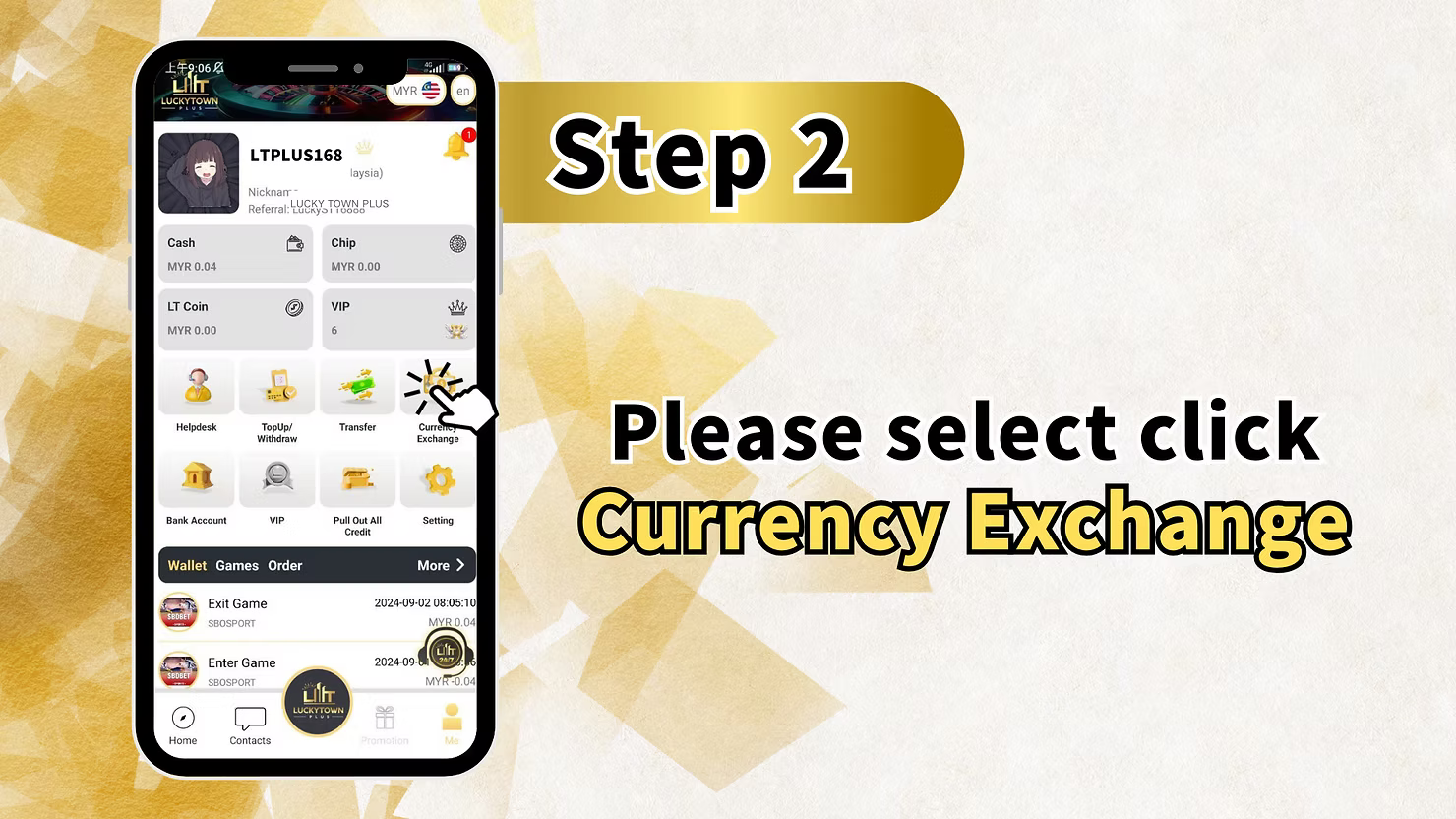
Step 2: Select Currency Exchange from the Menu
Within the ME section, locate and click on Currency Exchange to proceed with your LUCKY TOWN PLUS exchange currency request. This option takes you to the conversion interface where you can convert between MYR and THB.
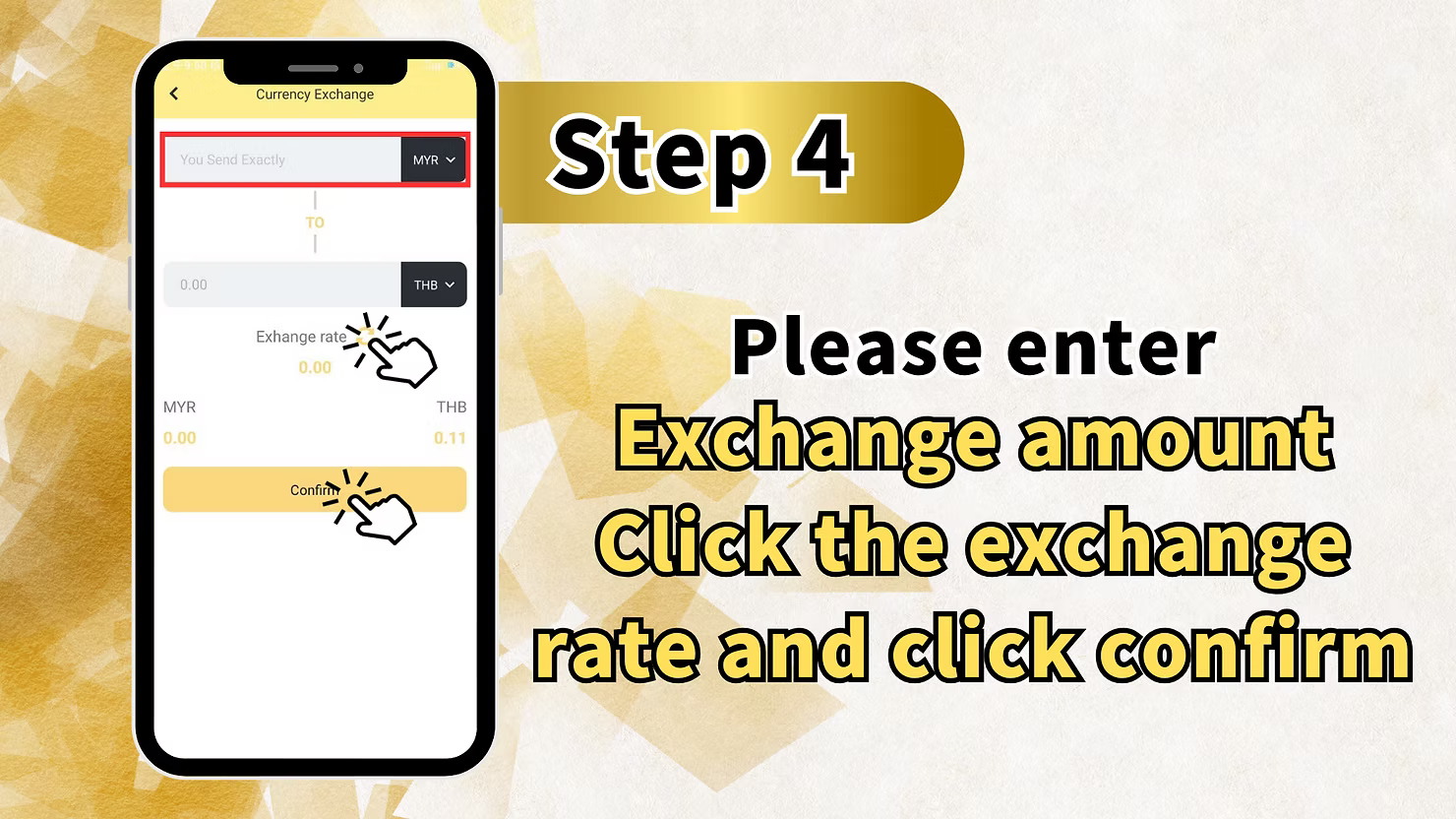
Step 3: Enter the Amount You Wish to Exchange
On the Currency Exchange screen, you will see the conversion interface. The screen displays You Send Exactly with a field for entering your amount. Below this, you will see currency selectors: MYR on the left and THB on the right, indicating you are converting from Malaysian Ringgit to Thai Baht when using the Malaysia version.
Exchange Rate Display
The exchange rate is shown in the center of the screen. It updates automatically once you enter an amount, giving you transparency before committing to your LUCKY TOWN PLUS exchange currency transaction.
Enter Your Amount and Confirm
Please enter the exchange amount you wish to convert. After entering, verify the exchange rate displayed to ensure you are comfortable with the conversion value. Once confirmed, click the Confirm button to process your LUCKY TOWN PLUS exchange currency transaction. The conversion completes instantly.
Friendly Reminder for LUCKY TOWN PLUS Exchange Currency
Important Information About Reverse Conversions
After completing your LUCKY TOWN PLUS exchange currency conversion, you may need to convert back in the future. The platform provides this important friendly reminder to guide you.
To Convert THB Back to MYR
To convert THB back to MYR, please go to Convert in Thai version. This means you need to switch to the Thai version of the LUCKY TOWN PLUS app to convert Thai Baht back to Malaysian Ringgit.
To Convert MYR Back to THB
To convert MYR back to THB, please go to Malaysia version. You are currently in the Malaysia version, which handles MYR to THB conversions.
Important Guidelines for LUCKY TOWN PLUS Exchange Currency
Currency Pairs Supported
The LUCKY TOWN PLUS exchange currency feature currently supports MYR and THB conversions. This allows members to move funds between the Malaysian and Thai platforms without using external exchange services.
Version Switching Requirement
A key aspect of LUCKY TOWN PLUS exchange currency is that conversions are directional based on app version. MYR to THB conversions occur in the Malaysia version. THB to MYR conversions require switching to the Thai version.
Exchange Rate Transparency
The LUCKY TOWN PLUS exchange currency interface displays the current exchange rate before you confirm your transaction. This helps you understand exactly what rate you are receiving before committing.
Simple Confirmation Process
After entering your amount and verifying the rate, one click of the Confirm button completes your LUCKY TOWN PLUS exchange currency transaction. The process is designed for speed and simplicity.
Frequently Asked Questions About LUCKY TOWN PLUS Exchange Currency
What currencies can I exchange at LUCKY TOWN PLUS?
The LUCKY TOWN PLUS exchange currency feature currently supports MYR and THB. You can convert between these two currencies directly in the app.
How do I convert MYR to THB on LUCKY TOWN PLUS?
Access the Malaysia version of the app, go to ME, select Currency Exchange, enter your MYR amount, verify the exchange rate, and click Confirm. Your converted THB will be available instantly.
How do I convert THB back to MYR on LUCKY TOWN PLUS?
To convert THB back to MYR, you need to switch to the Thai version of the LUCKY TOWN PLUS app and use the same exchange flow there.
Where do I find the exchange rate?
The exchange rate is displayed in the center of the LUCKY TOWN PLUS exchange currency screen. It updates based on the amount you enter and current market conditions.
Is there a fee for currency exchange at LUCKY TOWN PLUS?
The displayed exchange rate includes the effective conversion value. Review the rate shown before confirmation so you know exactly what you will receive.
What happens after I click Confirm on currency exchange?
After clicking Confirm on your LUCKY TOWN PLUS exchange currency transaction, the conversion is processed immediately. Your source balance decreases and the converted balance is credited instantly.
Why do I need to switch versions for reverse conversion?
The directional conversion design keeps each version simple and prevents confusion about which currency you are converting from and to.
Why Choose LUCKY TOWN PLUS Exchange Currency
Seamless Cross-Currency Management
LUCKY TOWN PLUS exchange currency lets members manage funds between Malaysian and Thai platforms without relying on external exchange tools.
App Version Integration
The directional conversion system keeps the interface simple and prevents confusion about the conversion direction.
Transparent Rate Display
With the exchange rate shown before confirmation, LUCKY TOWN PLUS exchange currency gives you visibility and confidence before every conversion.
Simple Three-Step Process
The ME, Currency Exchange, amount entry, and confirm flow makes LUCKY TOWN PLUS exchange currency easy to use for all members.
Clear Friendly Reminders
The platform provides direct reminders about version switching for reverse conversions, helping members avoid confusion and complete the process successfully.
Start Your LUCKY TOWN PLUS Exchange Currency Today
Seamless Cross-Currency Financial Management
The LUCKY TOWN PLUS exchange currency feature helps members across different regions manage funds without external converters. Everything happens directly within your LUCKY TOWN PLUS account.
Simple Three-Step Conversion Process
The three-step guide is straightforward: open ME, select Currency Exchange, enter your amount, verify the exchange rate, and confirm.
Directional Design and Version Switching
The reminder about version switching prevents confusion when members need reverse conversion. Malaysia version handles MYR to THB, while Thai version handles THB to MYR.
Accessible Financial Tools in Your Account Hub
The Currency Exchange option sits inside the ME menu alongside other financial tools, making it easy to locate when needed.
Transparency and Trust in Every Conversion
By showing the exchange rate before confirmation, LUCKY TOWN PLUS helps members make informed decisions and complete instant in-app conversions with confidence.
Your Gateway to Cross-Currency Flexibility at LUCKY TOWN PLUS
The simple process means even members unfamiliar with currency exchange can complete conversions confidently. Follow the steps, heed the version reminder, and enjoy seamless currency management within your LUCKY TOWN PLUS account.
Start Your LUCKY TOWN PLUS Exchange Currency Today
Convert MYR to THB instantly with our simple three-step guide. Access the ME menu, select Currency Exchange, enter your amount, and confirm. Need to convert back? Switch to the Thai version. LUCKY TOWN PLUS makes currency exchange simple, transparent, and fast.
Exchange Currency Now