
TNG Transfer Top Up at LUCKYTOWN PLUS - Complete Guide
Why Top Up with TNG Transfer at LUCKYTOWN PLUS?

Introduction to LUCKY TOWN PLUS TNG Transfer Topup
The LUCKY TOWN PLUS TNG transfer topup feature provides a modern and convenient way for members to add funds using Touch N Go, Malaysia's leading mobile e-wallet. This guide walks you through each stage, from opening the ME menu to uploading your payment confirmation. Approved transactions are typically processed by the finance team within 10 minutes after receipt verification.
Step-by-Step Guide to LUCKY TOWN PLUS TNG Transfer Topup
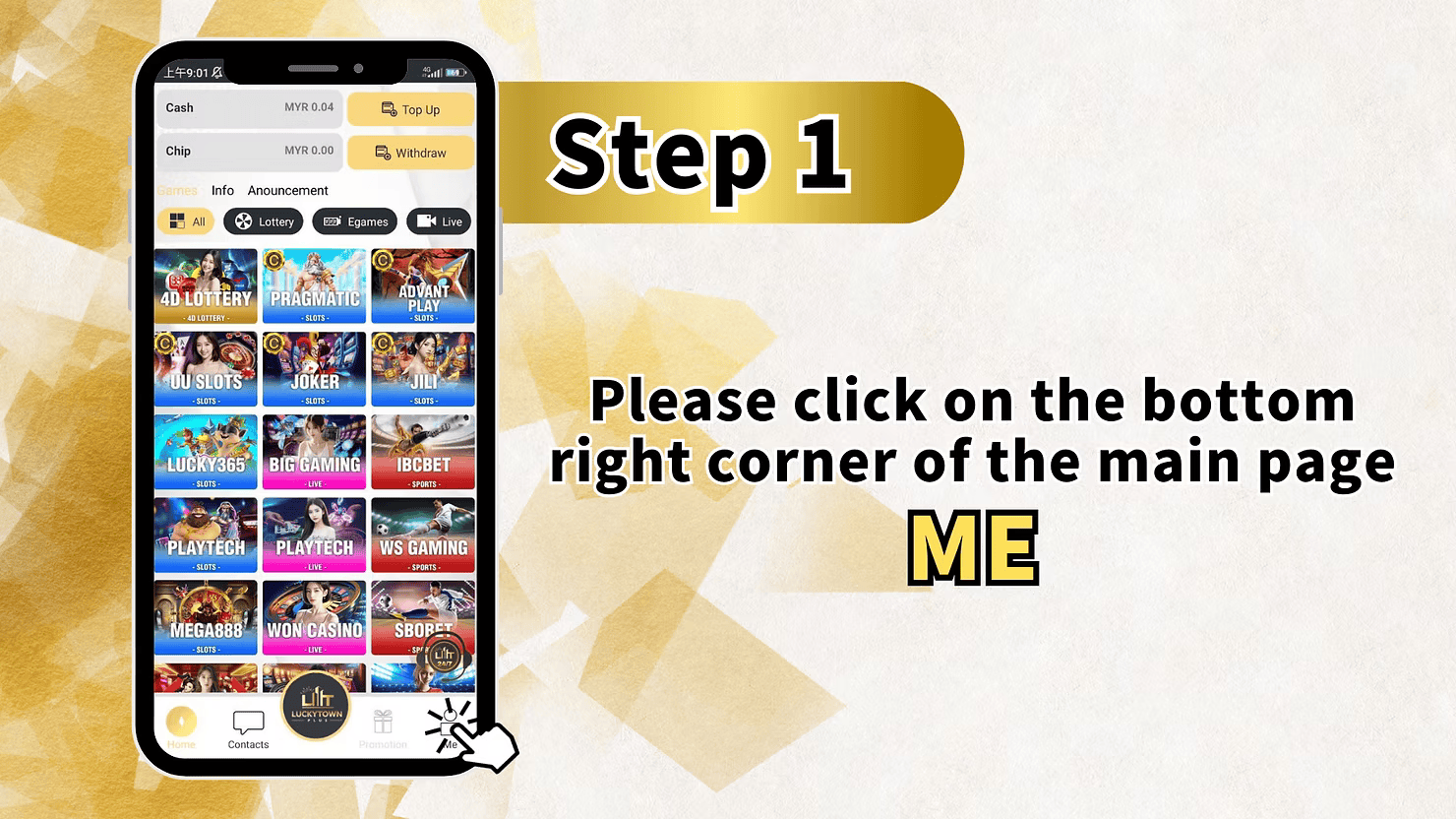
Step 1: Access the Main Menu via the ME Icon
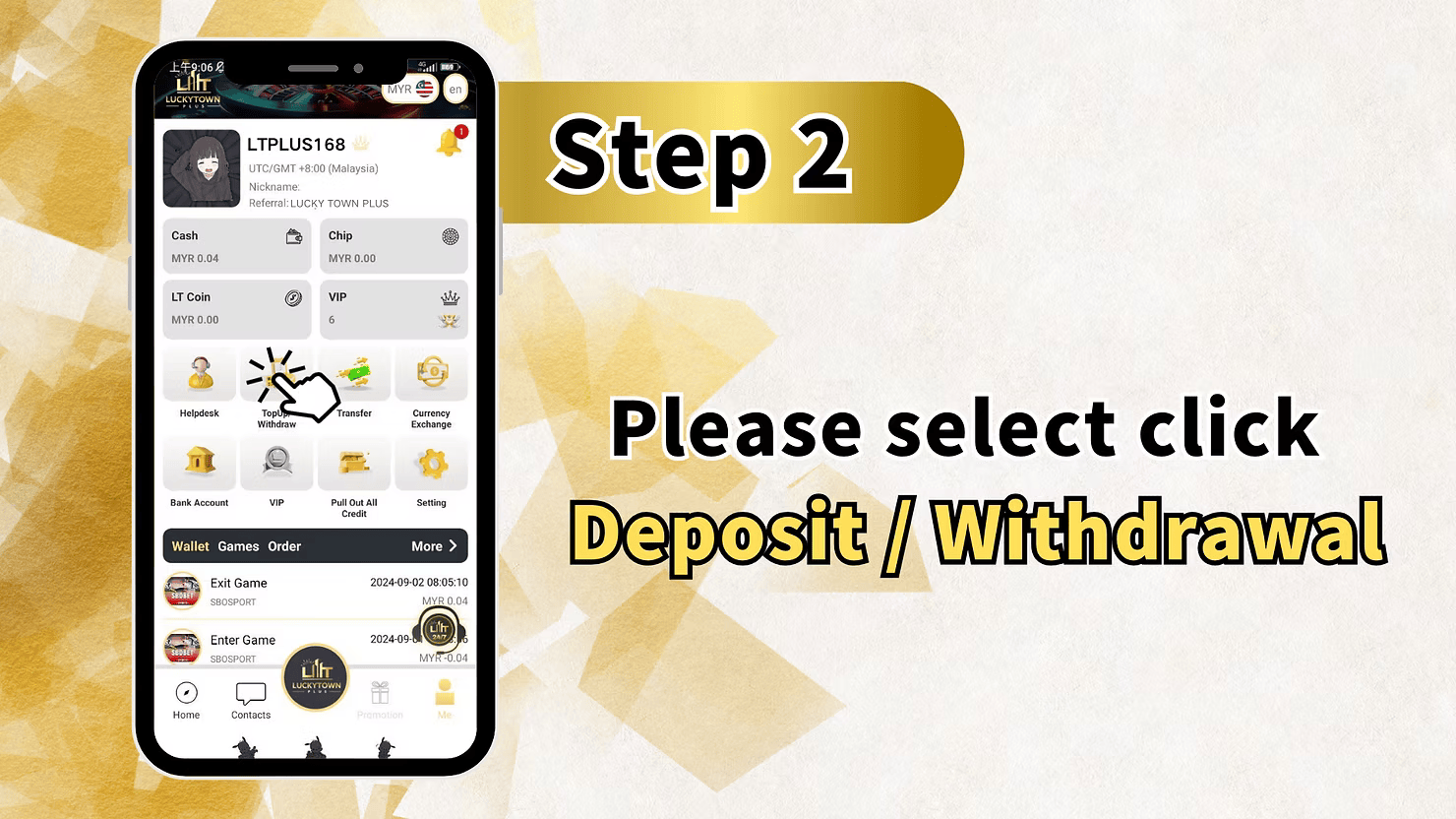
Log in to your account and tap the ME icon at the bottom right of the dashboard. This opens your account hub, where you can view balances, games, info updates, and the main Top Up and Withdraw shortcuts.
Step 2: Enter the Deposit & Withdrawal Section
Inside the ME section, select Deposit / Withdrawal to continue. This is the central area for all incoming and outgoing transactions on your account.
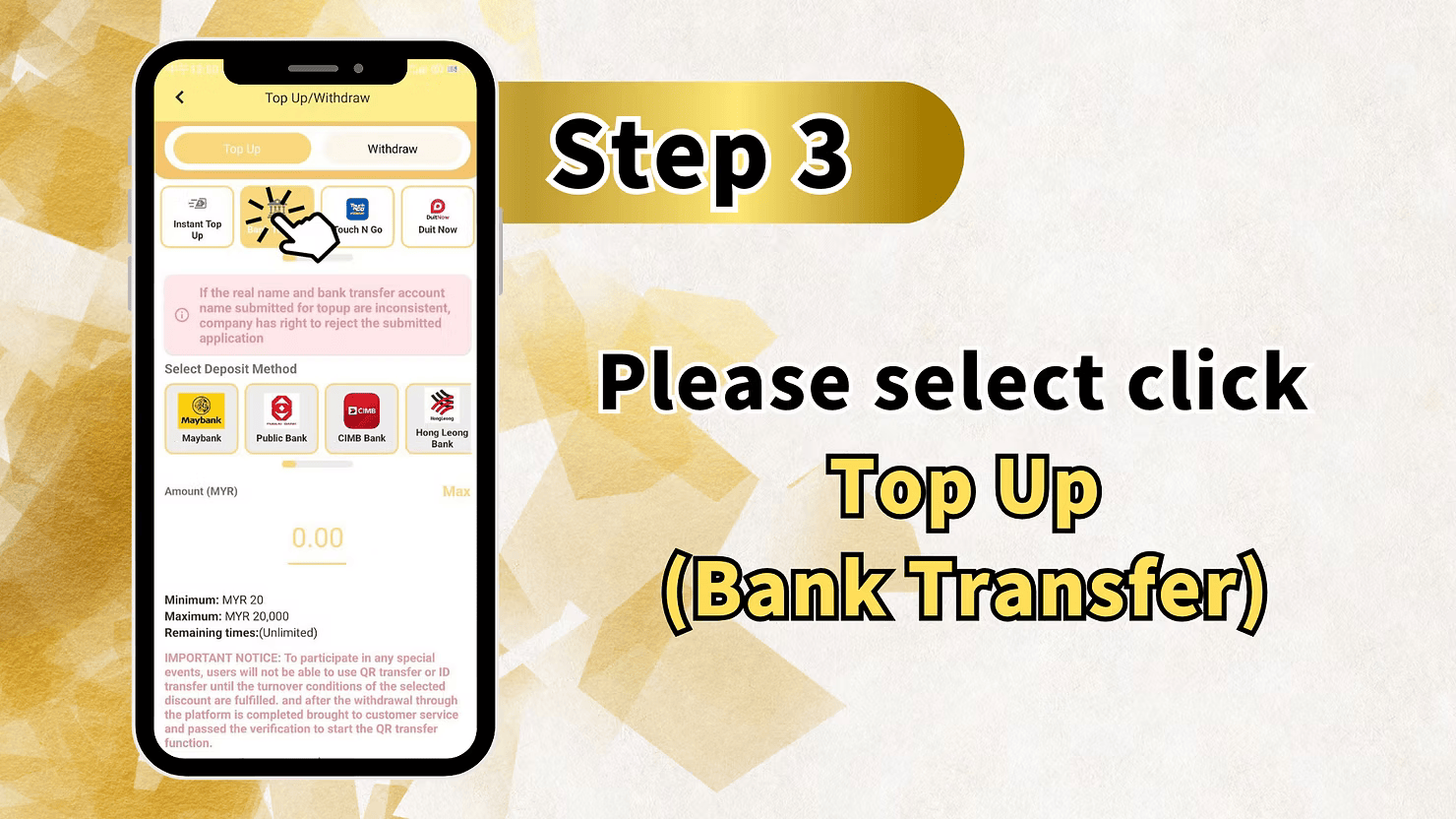
Step 3: Select Top Up and Choose TNG Payment Method
On the Deposit / Withdrawal screen, choose Top Up to begin. Before continuing, make sure the real name on your LUCKY TOWN PLUS account matches the name on your Touch N Go account, or the application may be rejected.
Select Deposit Method 每 Touch N Go Option
From the available deposit methods, choose Touch N Go for the direct TNG transfer flow. Duit Now is also available as an alternative e-wallet option.
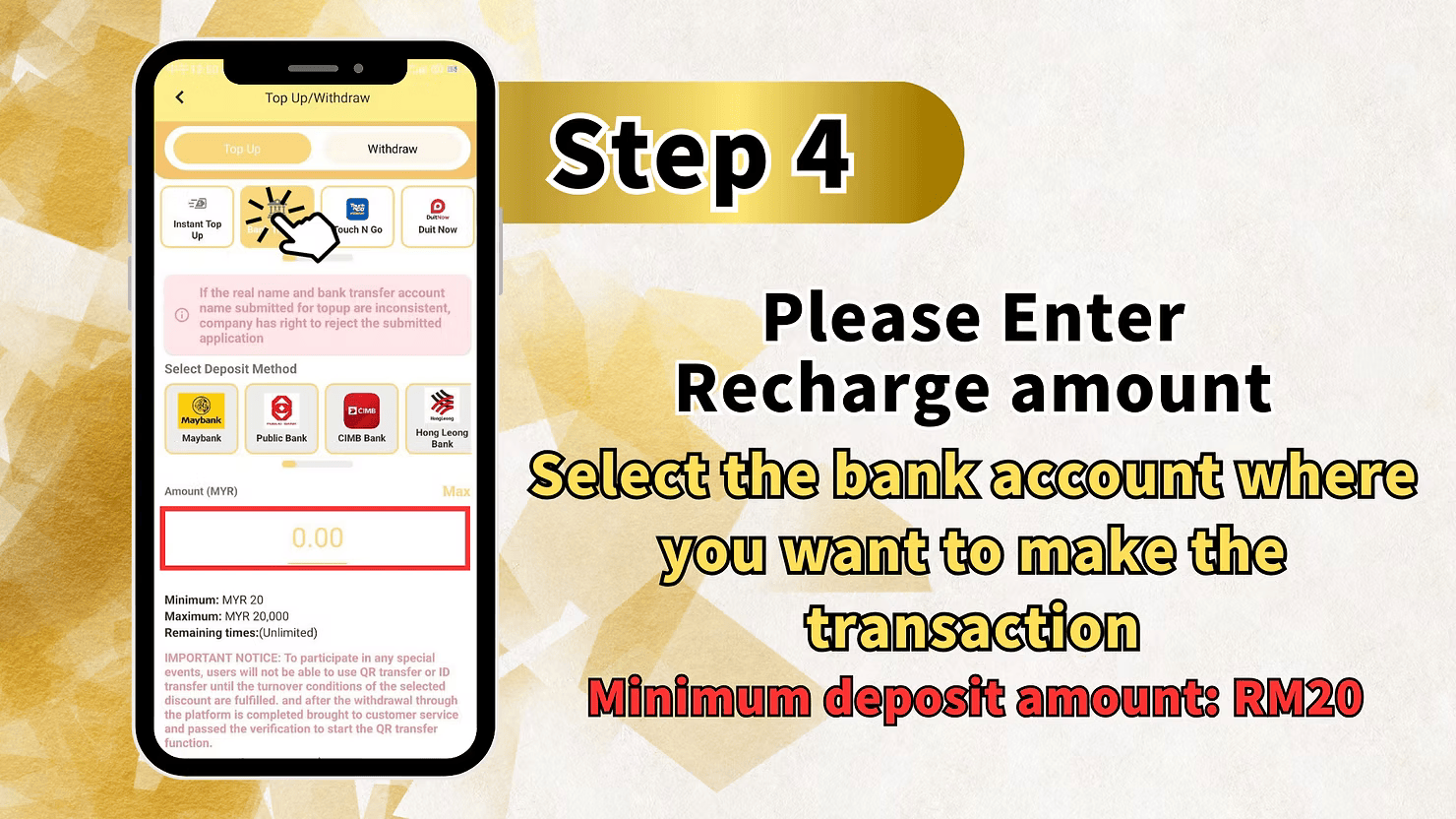
Enter Deposit Amount (MYR)
Enter the amount you want to deposit. The minimum deposit is MYR 20 and the maximum per transaction is MYR 20,000. The page shows the remaining time as unlimited, so you can complete the process without time pressure.
Click Top Up to Continue
After selecting the payment method and entering the amount, click Top Up to proceed to the confirmation stage of your TNG transfer topup.
Step 4: Confirm Recharge Amount and Payment Details
Review the recharge amount and payment details shown on the next screen. Confirm that your amount is at least RM20 and does not exceed RM20,000 before moving on.
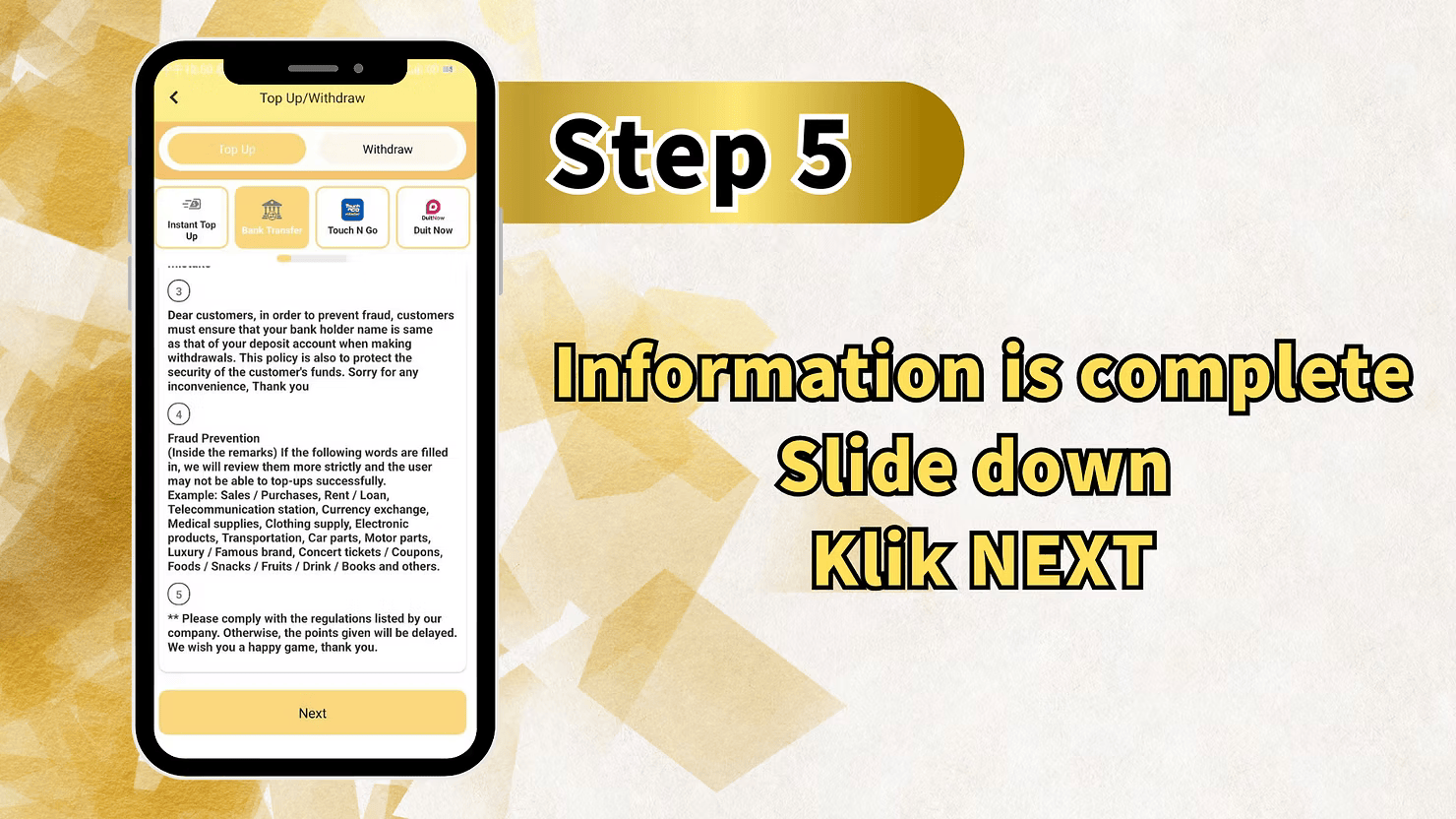
Step 5: Review Fraud Prevention Guidelines
Before final submission, read the fraud prevention notices carefully. LUCKY TOWN PLUS requires the account holder name used for the transfer to match your deposit account name to protect your funds.
Real Name Consistency Requirement
Your Touch N Go account holder name must be the same as your verified registered name. If the names do not match, your TNG transfer topup may be rejected.
Fraud Prevention 每 Restricted Keywords in Transfer Remarks
Avoid using restricted keywords in your transfer remarks, because they may trigger extra review or delay successful topups. Examples include Sales / Purchases, Rent / Loan, Telecommunication station, Currency exchange, Medical supplies, Clothing supply, Electronic products, Transportation, Car parts, Motor parts, Luxury / Famous brand, Concert tickets / Coupons, Foods / Snacks / Fruits / Drink / Books, and similar terms.
Compliance Statement
Please comply with the listed company regulations. Failure to do so may delay the crediting of your deposit.
Complete Information and Click NEXT
After checking the notices, confirm your information is accurate, scroll down, and click NEXT to continue.
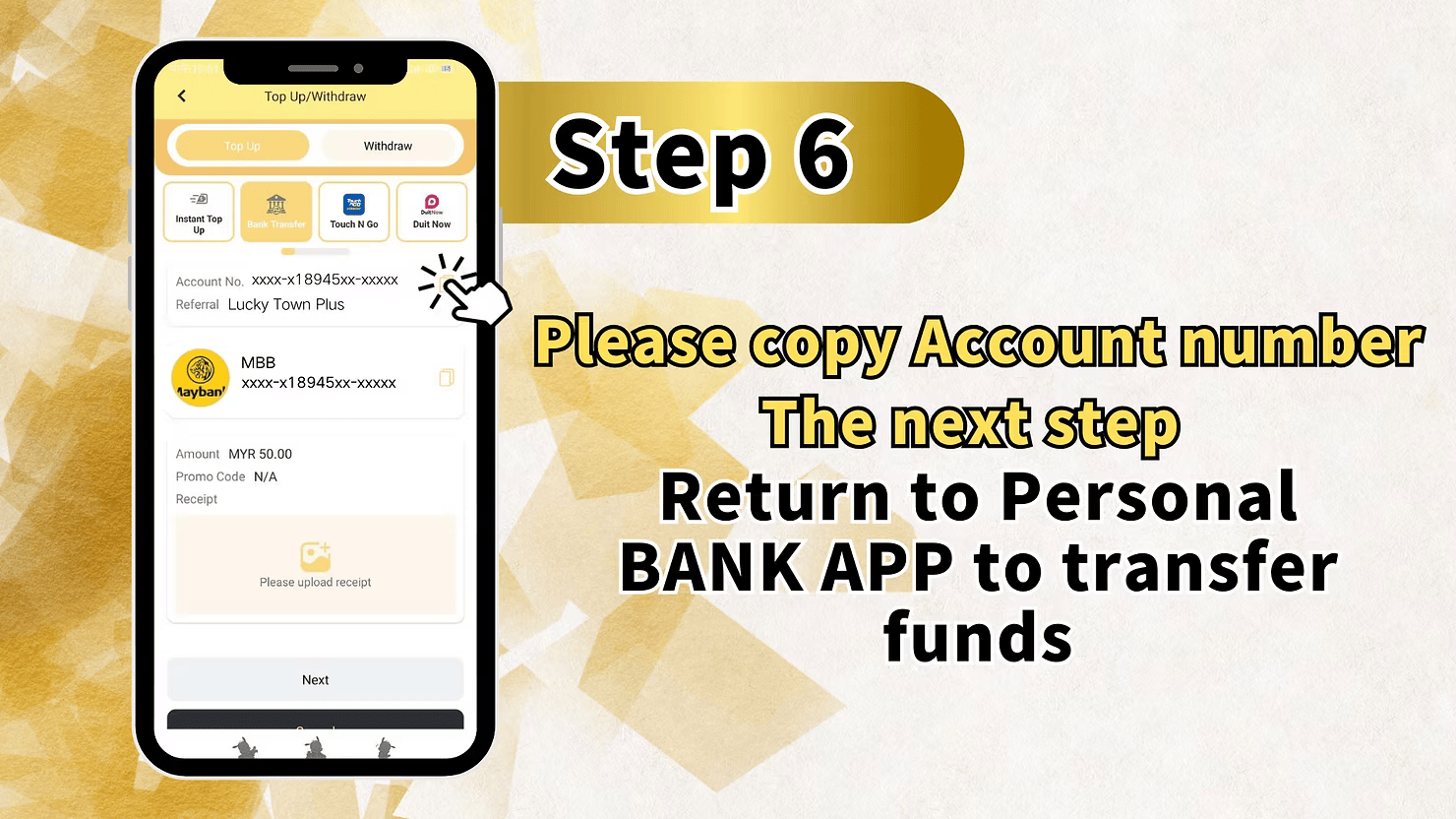
Step 6: Copy Account Details and Transfer via TNG App
The next screen displays the account number and reference for Lucky Town Plus. Copy the account number, open your TNG app, and complete the transfer there. After the transfer is done, return to the platform for receipt submission.
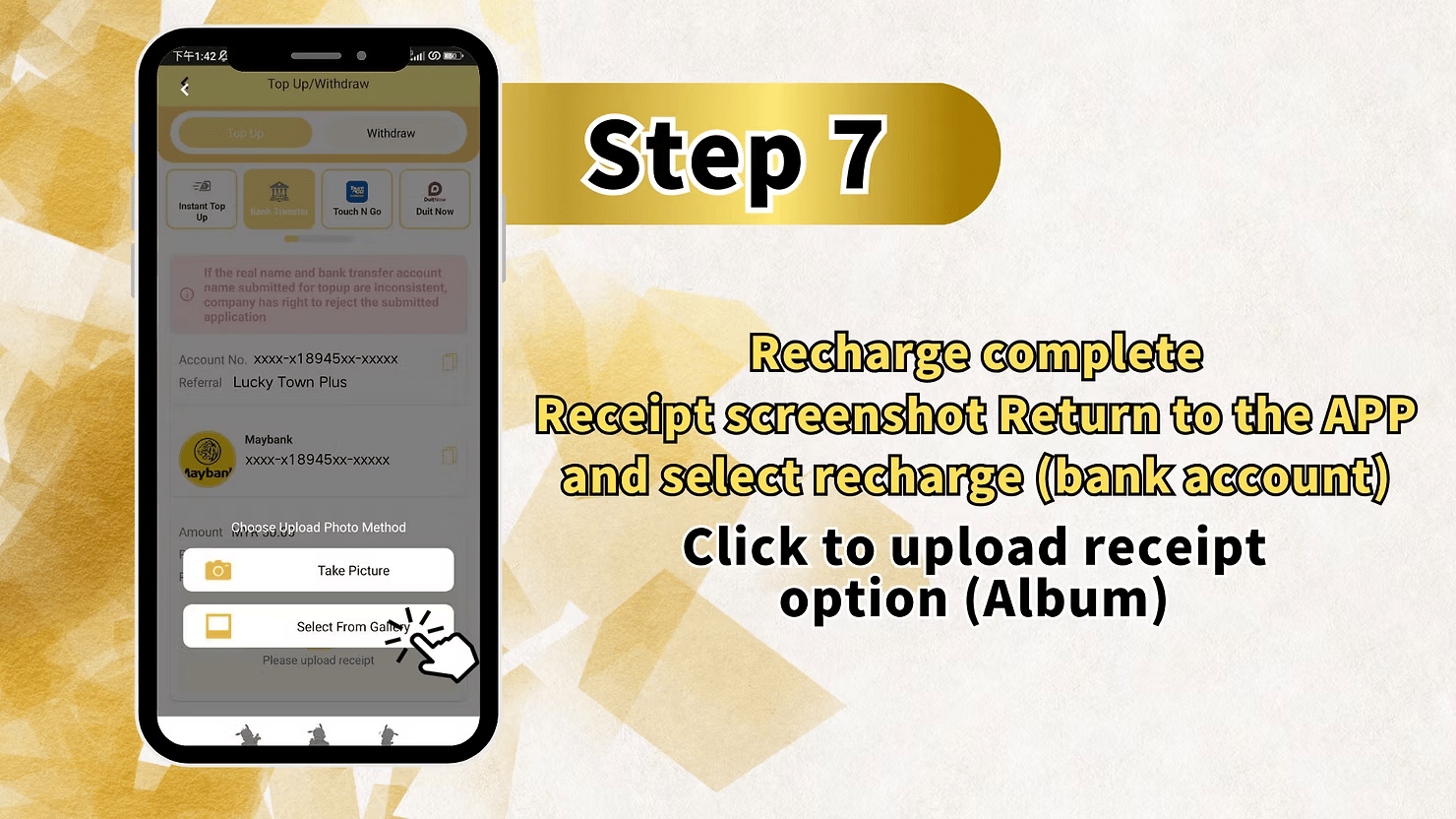
Step 7: Complete Recharge 每 Upload Payment Receipt
Return to the app, select Recharge (bank account), and upload your payment receipt from your photo album. Receipt upload is mandatory because the finance team uses it to verify your TNG transfer topup.
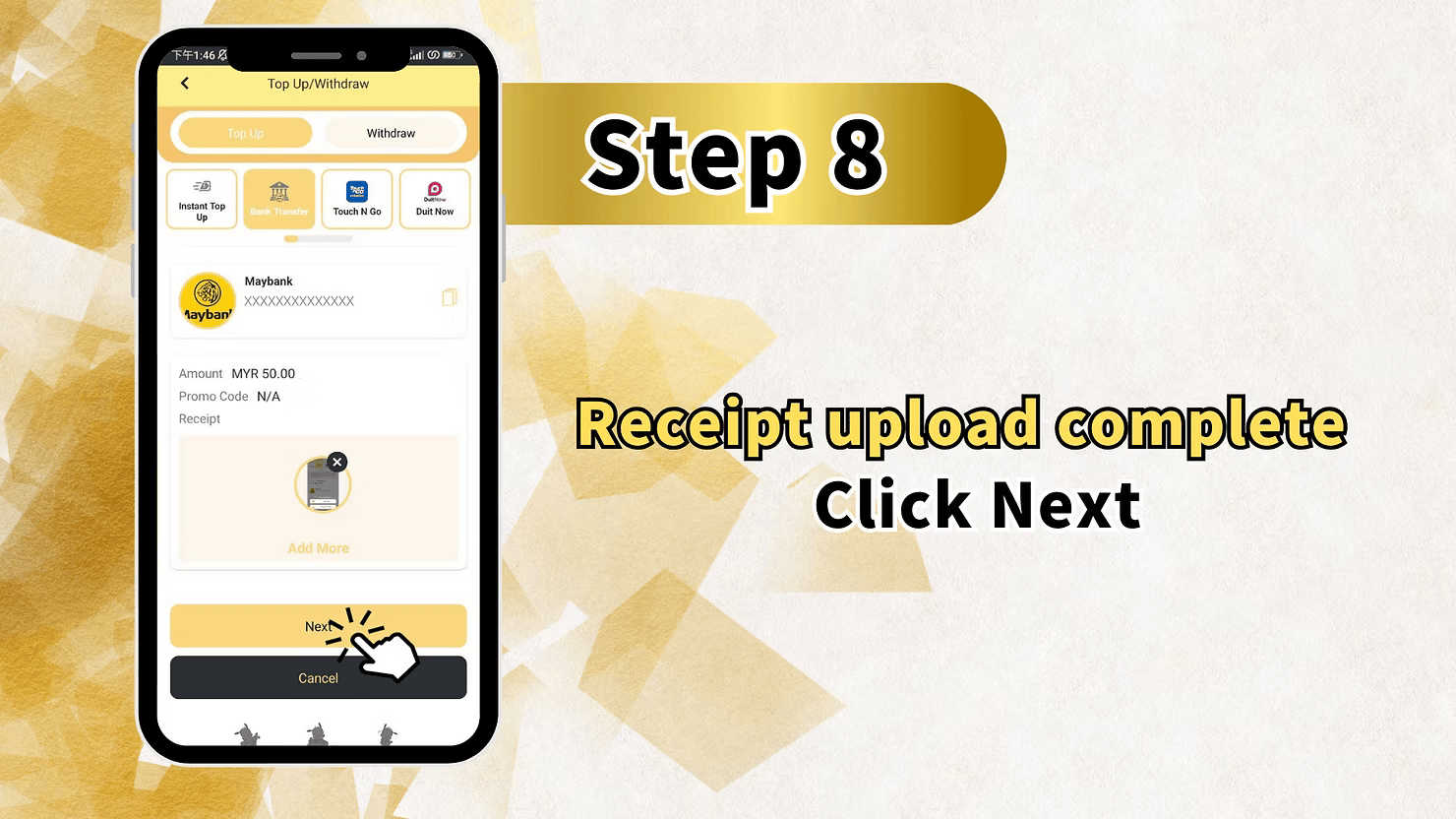
Step 8: Confirm Receipt Upload
Check the confirmation screen, which shows your payment method, account details, amount, promo code status, and uploaded receipt preview. You can add more receipts if needed, then click Next once everything matches.
Step 9: System Confirmation and Finance Processing
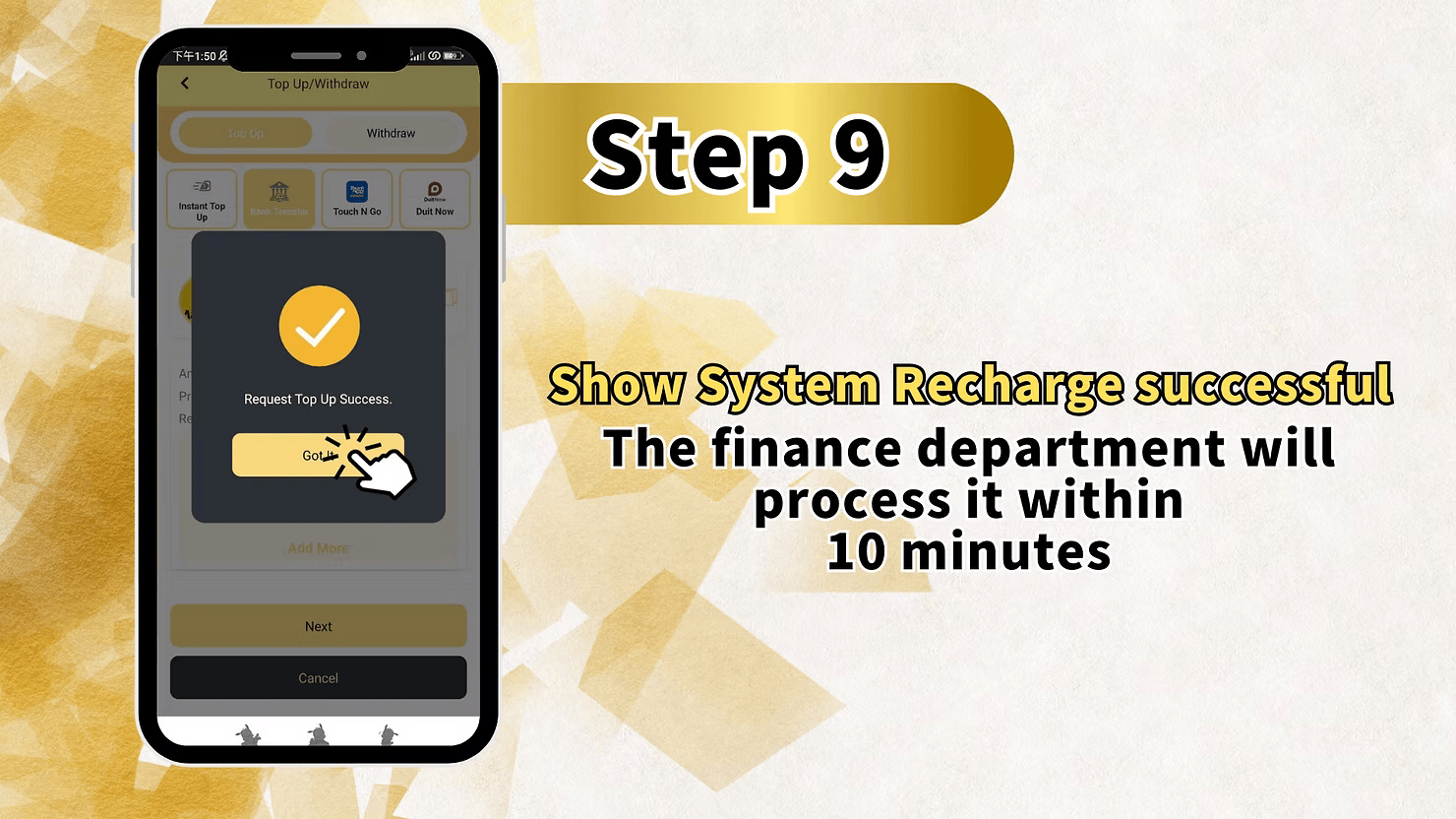
After submission, the system confirms that the recharge was successful. The finance department will process your deposit within 10 minutes, and your funds should appear shortly after verification.
Important Guidelines for LUCKY TOWN PLUS TNG Transfer Topup
Real Name Consistency Requirement
If the real name on your LUCKY TOWN PLUS account does not match the name on your Touch N Go account, the company has the right to reject the application. Confirm the names match exactly before starting any deposit.
Deposit Limits
The minimum deposit is MYR 20 and the maximum deposit per transaction is MYR 20,000. There is no time limit shown for completing the transfer once the flow starts.
Available Payment Methods
LUCKY TOWN PLUS supports Touch N Go, Duit Now, Maybank, Public Bank, CIMB Bank, Hong Leong Bank, and Mybank. For this guide, Touch N Go is the direct e-wallet option.
Fraud Prevention Measures
Members must use a matching account holder name and avoid restricted keywords in transfer remarks. These checks help prevent fraud and reduce the risk of delayed or rejected topups.
Processing Time
After you complete the transfer and upload the receipt, the finance department usually processes the transaction within 10 minutes during normal operating periods.
Frequently Asked Questions About LUCKY TOWN PLUS TNG Transfer Topup
What is the minimum amount for TNG transfer topup?
The minimum deposit amount is MYR 20, making Touch N Go topups accessible for all members.
What is the maximum amount for TNG transfer topup?
The maximum amount is MYR 20,000 per transaction. If you need more, you may need multiple transfers.
What payment methods are available for TNG topup?
The platform primarily uses Touch N Go for this flow, while also supporting Duit Now and major Malaysian banks for related deposit options.
What happens if my TNG account name doesn't match my LUCKY TOWN PLUS real name?
If the names are inconsistent, the company may reject the application. Ensure your verified real name and TNG account name match before transferring funds.
How long does processing take after receipt upload?
Once your receipt is uploaded successfully, the finance department usually processes the deposit within 10 minutes.
What keywords should I avoid in TNG transfer remarks?
Avoid restricted terms such as Sales, Purchases, Rent, Loan, Telecommunication station, Currency exchange, Medical supplies, Clothing supply, Electronic products, Transportation, Car parts, Motor parts, Luxury, Famous brand, Concert tickets, Coupons, Foods, Snacks, Fruits, Drink, Books, and similar commercial wording.
What if my topup doesn't process within 10 minutes?
If your topup takes longer than the normal 10-minute window, contact customer support and provide your receipt together with the transfer details.
Why Choose LUCKY TOWN PLUS TNG Transfer Topup
Secure and Convenient E-Wallet Deposits
Touch N Go gives members a familiar and secure e-wallet channel for instant deposit transfers.
Clear Step-by-Step Guidance
The nine-step guide is designed so even first-time users can complete the TNG transfer flow with confidence.
Fast Processing Times
With receipt-based verification and finance handling within 10 minutes, approved deposits move quickly into your account.
Low Minimum Deposit
The RM20 minimum keeps the deposit flow accessible for members across different spending levels.
Fraud Protection
Name matching requirements and restricted-keyword screening help protect both the platform and members from misuse.
Start Your LUCKY TOWN PLUS TNG Transfer Topup Today
The Touch N Go topup flow gives Malaysian players a modern way to fund their accounts through an e-wallet they already use every day. Follow the steps above, keep your account details consistent, upload your receipt, and complete your deposit with a minimum of RM20 and a maximum of RM20,000.
Start TNG Transfer Topup Now