
Recommend Friends at LUCKYTOWN PLUS - Complete Guide
Why Refer Friends to LUCKYTOWN PLUS?

LUCKY TOWN PLUS makes it easy to share the excitement with friends and family. The Recommend Friends feature allows you to invite others to join the platform using multiple convenient methods. Whether you prefer sharing a QR code, copying a registration link, or using the transfer option, LUCKY TOWN provides flexible tools to help you grow your community of fellow players. By recommending friends, you help others discover the secure and rewarding experience that LUCKY TOWN PLUS offers.
How to Recommend Friends on LUCKY TOWN PLUS

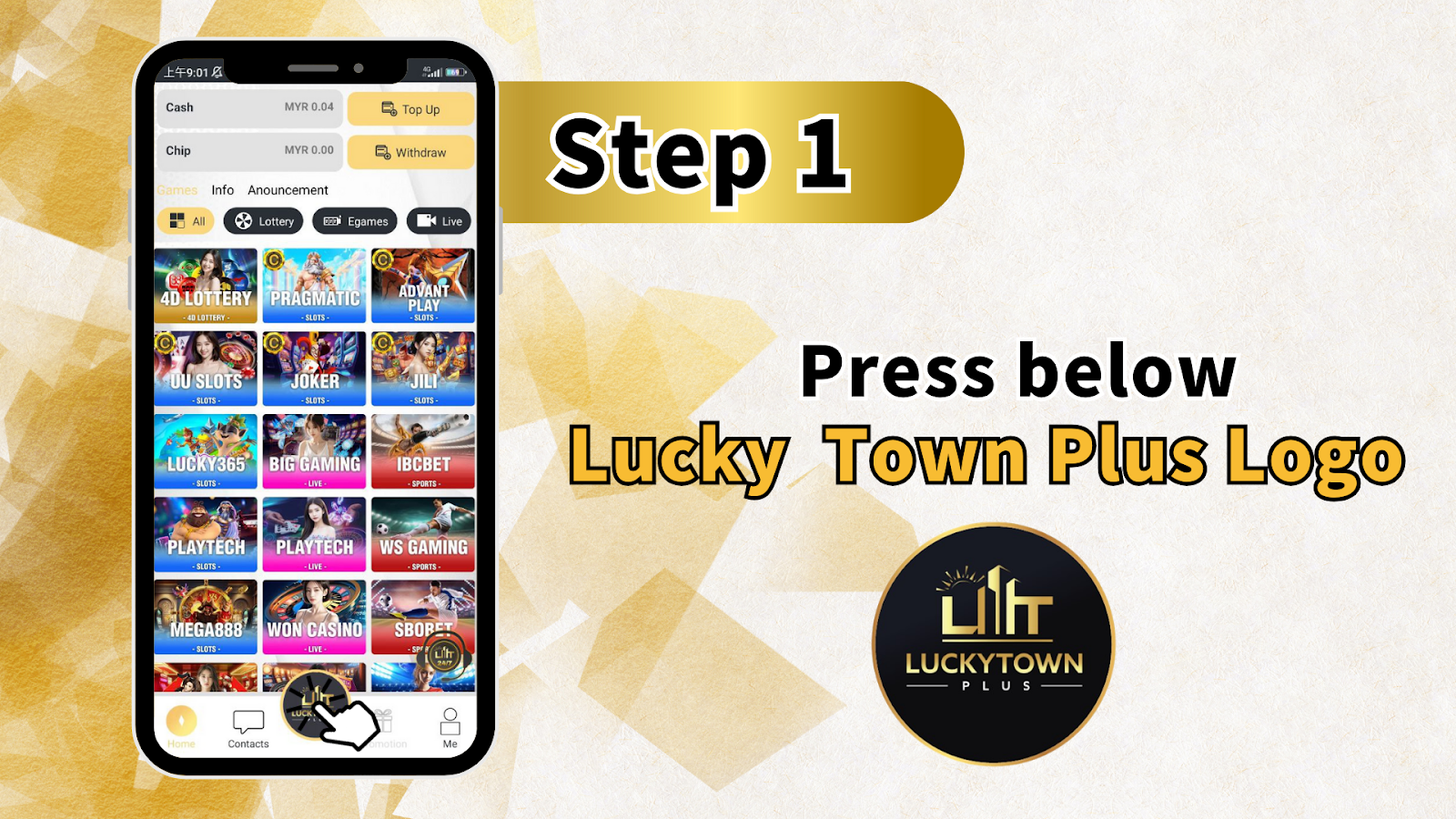
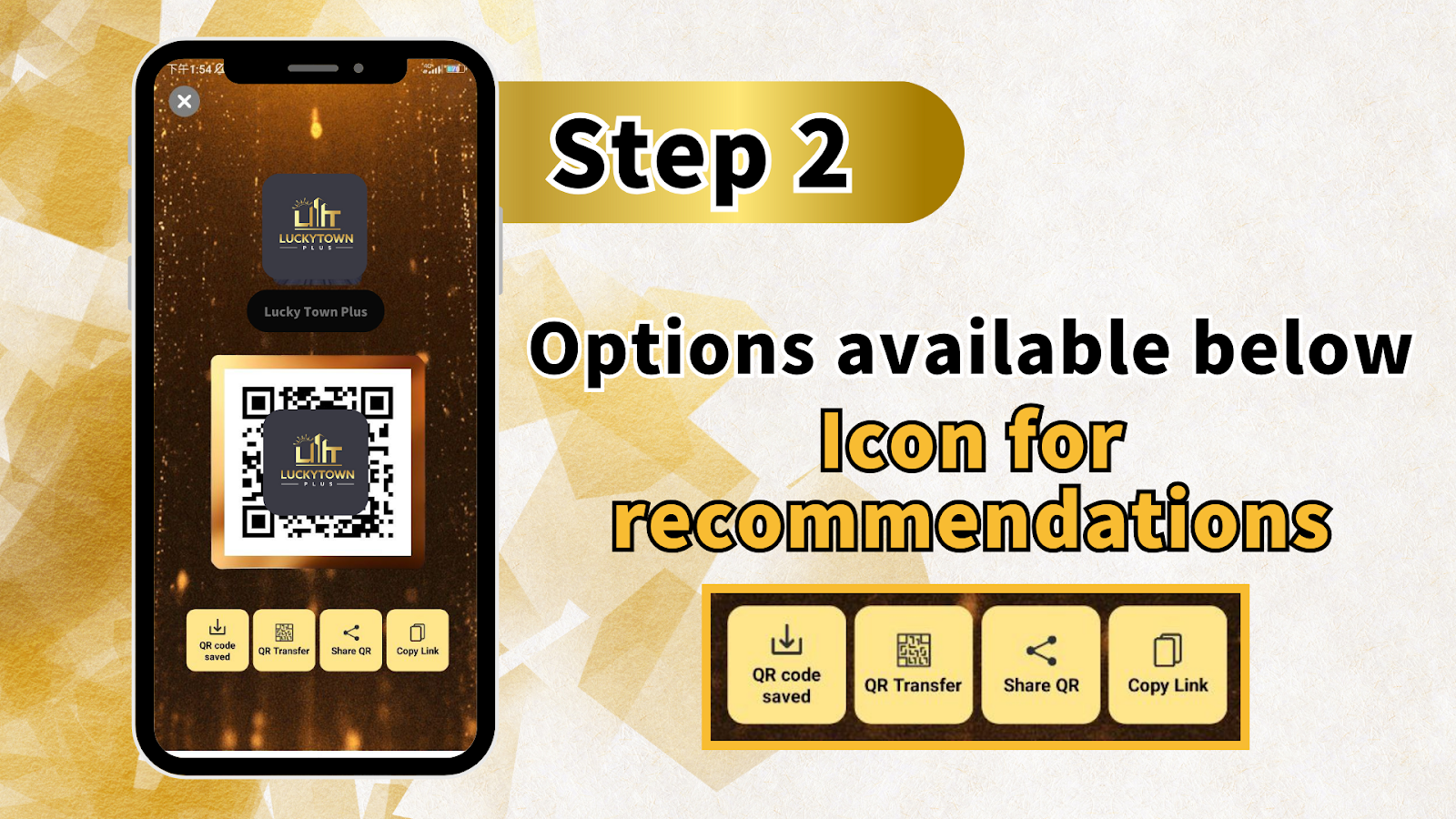
Step 1: Access the Recommend Friends Feature
To begin recommending friends, log in to your LUCKY TOWN PLUS account. Navigate to the Recommend Friends section from the main menu or dashboard. You will find the LUCKY TOWN PLUS logo displayed prominently, indicating that you are in the correct location to start the invitation process. Tap on the logo or the designated button to proceed.
Step 2: Choose Your Preferred Sharing Method
Once you access the Recommend Friends section, you will see several options for sharing LUCKY TOWN PLUS with others. The available methods include: Save QR Code, Transfer, Share QR Code, and Copy Link. Each method is designed for convenience, allowing you to choose the option that best suits your sharing preferences.
Step 3: Share with Friends
After selecting your preferred sharing method, distribute the QR code or registration link to your friends. When they use your unique code or link to register, they will be directed to the LUCKY TOWN PLUS sign-up page. Your recommendation helps friends discover the platform while ensuring they connect through your invitation.
Understanding the Recommend Friends Options
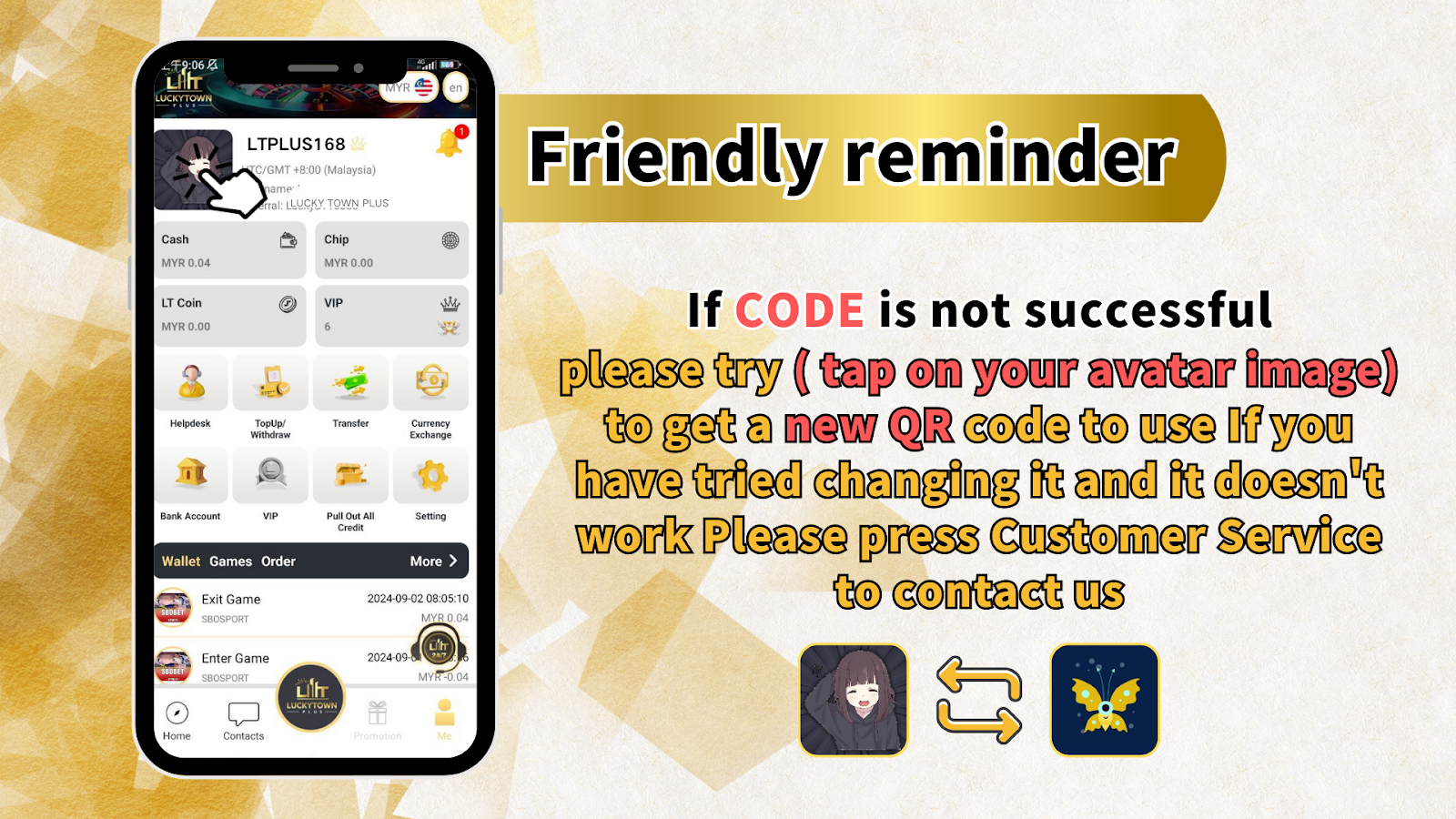
Save QR Code for Promotion
The Save QR Code option allows you to download a unique QR code associated with your LUCKY TOWN PLUS account. This QR code can be saved to your device, printed for physical distribution, or shared in any offline context. This method is ideal for players who wish to promote LUCKY TOWN in person or through printed materials.
Transfer Option
The Transfer option enables you to scan a code to transfer funds or share account information with another LUCKY TOWN PLUS player. This feature is particularly useful for existing members who want to facilitate transactions between accounts while also introducing new users to the platform.
Share QR Code
The Share QR Code function allows you to send your unique QR code directly to friends through various applications. After selecting this option, you can choose from installed apps such as messaging platforms, social media networks, or email clients. This method provides instant digital sharing with just a few taps.
Copy Link
The Copy Link option copies your unique registration link to your device's clipboard. You can then paste this link into any message, email, social media post, or document. When your friends click the link, they will be taken directly to the LUCKY TOWN PLUS registration page, with your referral automatically tracked.
Troubleshooting Tips for Recommend Friends
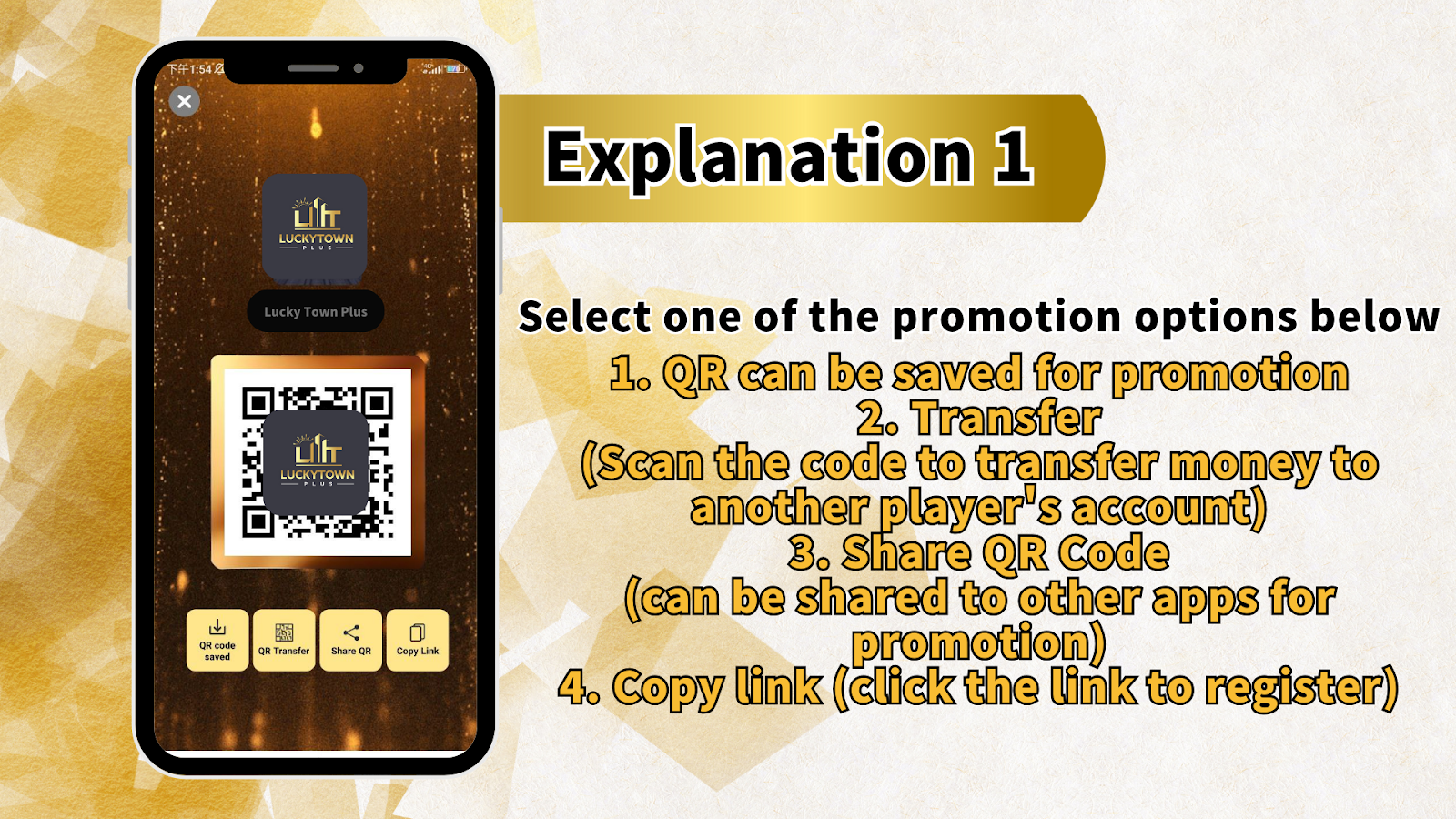
What to Do If the Code Is Not Successful
If you encounter issues where your QR code or referral link does not work as expected, LUCKY TOWN PLUS provides a simple solution. Tap on your avatar image within the app or website to generate a new QR code. This action refreshes your unique code, resolving most common issues with code functionality. After generating a new code, try sharing again using your preferred method.
Contact Customer Support for Assistance
If you have tried generating a new QR code and the issue persists, LUCKY TOWN PLUS customer support is available to assist. Press the Customer Service button to connect with support representatives who can help resolve any technical difficulties with the Recommend Friends feature. The support team is dedicated to ensuring that your invitation process is smooth and successful.
Frequently Asked Questions About Recommend Friends
Do I need a special code to recommend friends?
Yes, each LUCKY TOWN PLUS member has a unique QR code and referral link associated with their account. These codes are automatically generated and can be accessed through the Recommend Friends section. Sharing your unique code ensures that your friends are properly linked to your invitation.
Can I recommend friends using multiple methods?
Absolutely. LUCKY TOWN PLUS allows you to use any combination of the available sharing methods. You can save your QR code for offline promotion, share it digitally, copy the link for text messages, or use the transfer option from the same Recommend Friends interface.
What happens if my friend uses my referral link?
When a friend registers using your unique QR code or copy link, their account will be associated with your referral. This connection may qualify you for referral rewards or promotional benefits, depending on active promotions at the time of registration. Check the promotions page for current referral bonus offers.
How do I get a new QR code if mine is not working?
If your QR code is not functioning properly, simply tap on your avatar image within the LUCKY TOWN PLUS interface. This action generates a fresh QR code for your account. Use the newly generated code for all future sharing to ensure successful referrals.
Start Recommending Friends to LUCKY TOWN PLUS Today
The Recommend Friends feature on LUCKY TOWN PLUS makes it simple to share the platform with those you know. With multiple sharing options including QR code save, transfer, share QR code, and copy link, you can choose the method that works best for your situation. Whether you are inviting one friend or promoting to a wider network, LUCKY TOWN provides the tools you need to grow your community.
To begin, log in to your LUCKY TOWN PLUS account and navigate to the Recommend Friends section. Select your preferred sharing method, distribute your unique QR code or link, and watch as your friends discover the secure and rewarding experience that LUCKY TOWN offers. If you encounter any issues, remember that tapping your avatar generates a fresh QR code, and customer support is always available to assist. Start recommending friends today and help others join the LUCKY TOWN community.
Start Recommending Friends at LUCKY TOWN PLUS Now