
Forgot Transfer Password at LUCKYTOWN PLUS - Complete Guide
Why Your Transfer Password Matters at LUCKYTOWN PLUS


Introduction to LUCKY TOWN PLUS Forgot Transfer Password
The LUCKY TOWN PLUS forgot transfer password guide helps members recover or change their 6-digit transaction PIN (payment PIN) used for withdrawals and financial transactions. Whether you remember your current PIN and want to change it for security reasons, or you've forgotten it completely and need recovery, this comprehensive guide walks you through both methods. LUCKY TOWN members can reset their transaction PIN securely using OTP verification sent to their registered phone number, ensuring your funds remain protected at all times.
Method 1: LUCKY TOWN PLUS Change Payment PIN (When You Know Current PIN)
Step 1: Access the Main Menu via the ME Icon
To begin your LUCKY TOWN PLUS change payment PIN process while logged in, navigate to the main page of your account. Locate and click on the bottom right corner where you will find the "ME" icon. Tapping this opens your personal account hub, where you can view your Cash balance, Chip balance, Games library, Info updates, and Announcements.
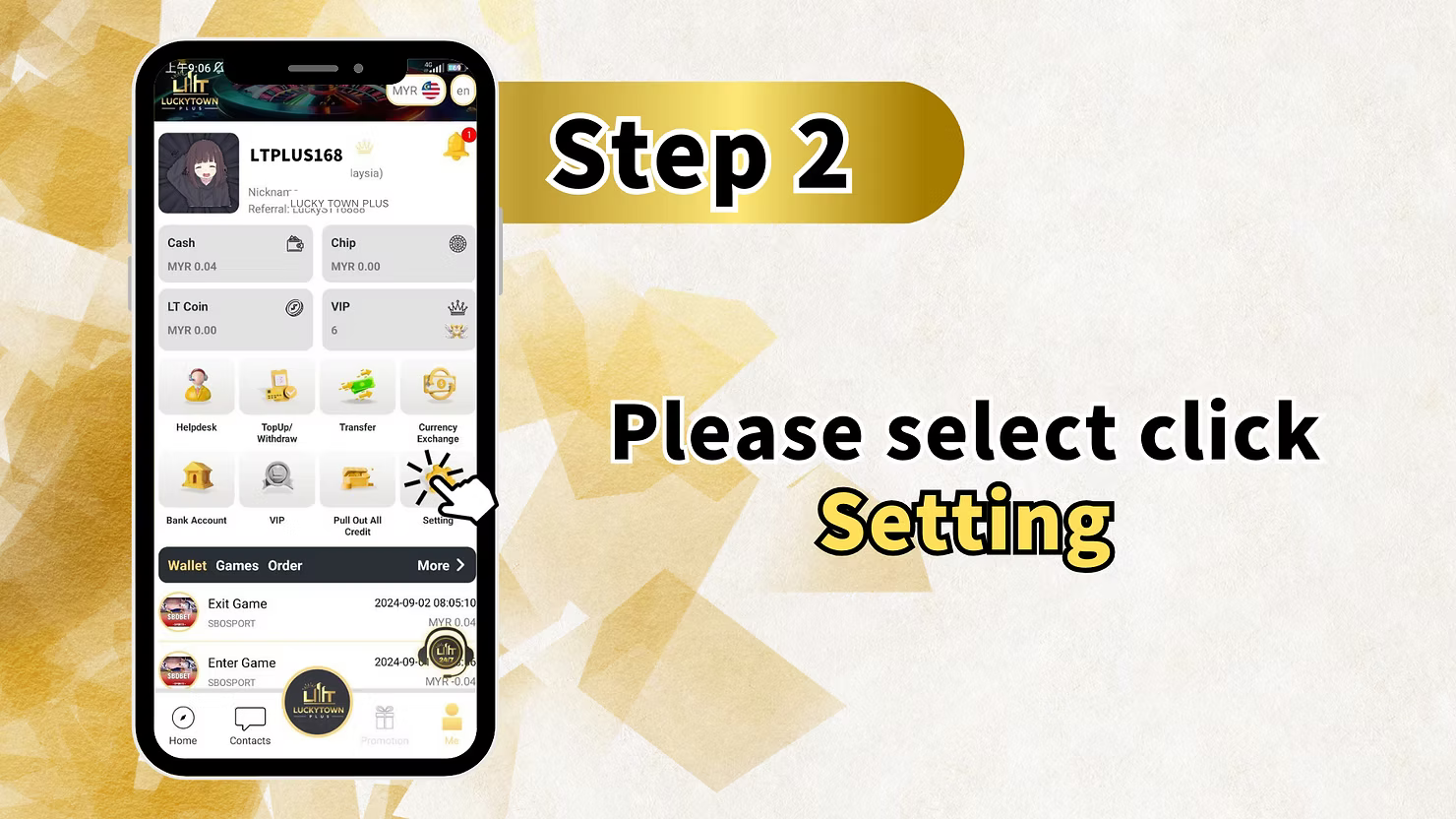
Step 2: Select Settings from the Menu
Within the ME section, locate and click on "Setting" to access your account configuration options for LUCKY TOWN PLUS change payment PIN and other preferences. The Settings menu contains all your account management tools in one central location.
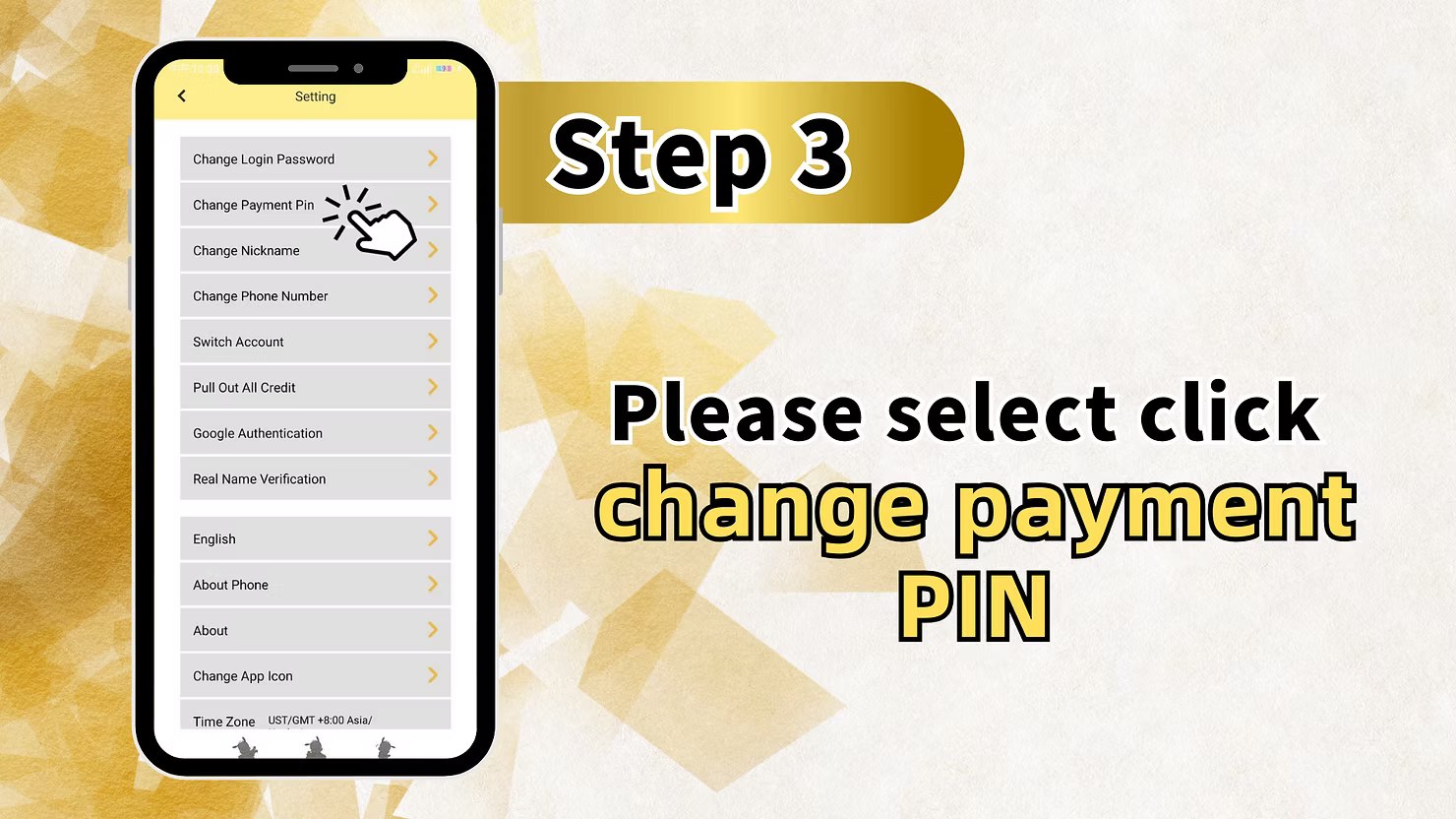
Step 3: Choose Change Payment PIN
Within the Setting menu, you will find multiple options including Change Login Password, Change Payment Pin, Change Nickname, Change Phone Number, Switch Account, Pull Out All Credit, Google Authentication, Real Name Verification, English language selection, About Phone, About, Change App Icon, and Time Zone. Click on "Change Payment Pin" to begin your LUCKY TOWN PLUS change payment PIN process.
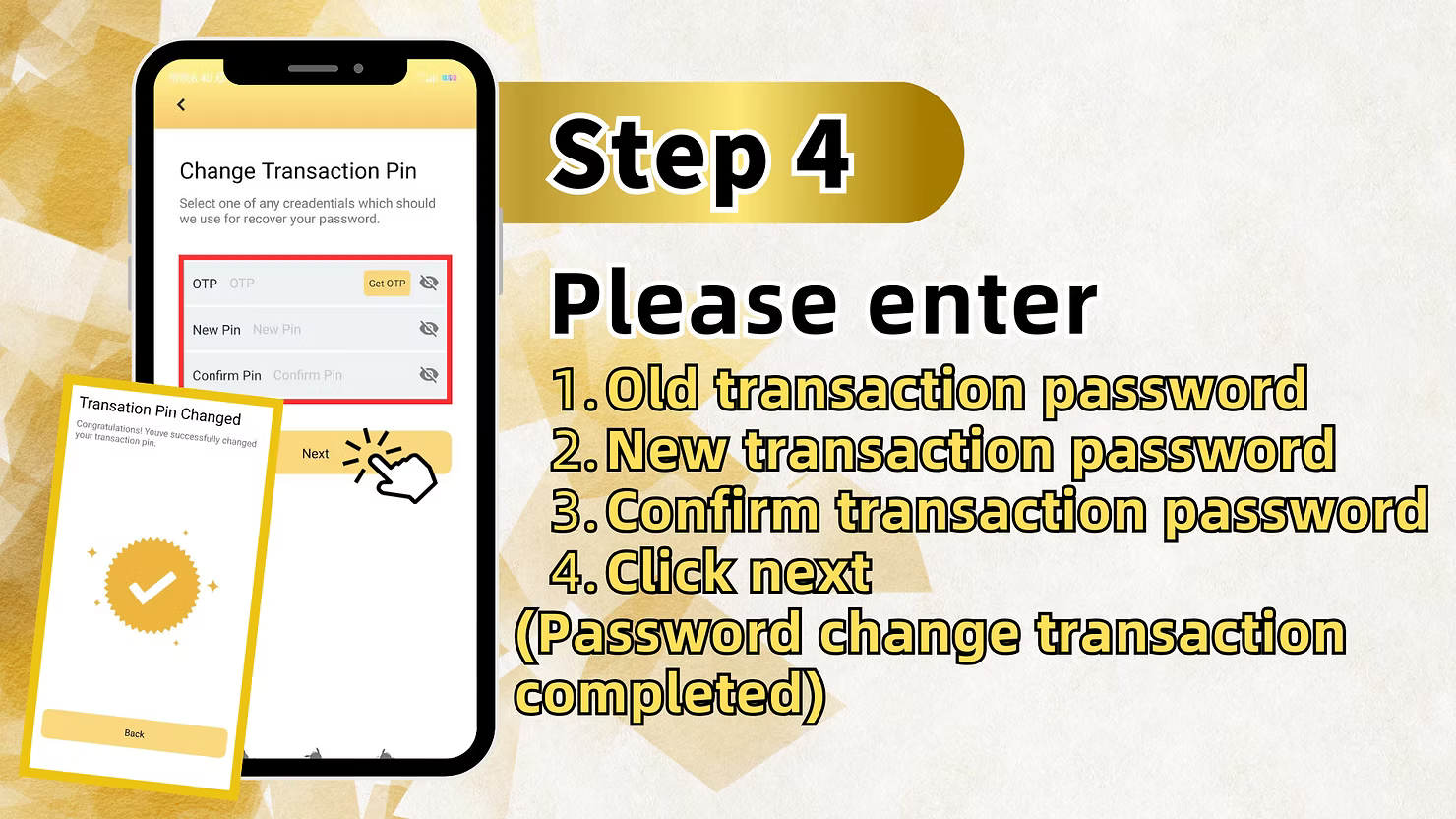
Step 4: Enter Old and New Transaction PIN
On the Change Transaction Pin screen, you will see three fields: Old transaction password, New transaction password, and Confirm transaction password. Enter your current 6-digit transaction PIN in the Old Transaction Password field. Then create a new 6-digit transaction PIN and enter it in both New Transaction Password and Confirm Transaction Password fields to ensure they match exactly.
Step 5: Confirm PIN Change
After entering all fields correctly, click Next to complete your LUCKY TOWN PLUS change payment PIN request. The system will confirm that your password change transaction is completed. You can now use your new transaction PIN for withdrawals and financial transactions.
Method 2: LUCKY TOWN PLUS Forgot Transfer Password Recovery (Via Withdrawal Page)
Step 1: Access Deposit & Withdrawal Section
If you need LUCKY TOWN PLUS forgot transfer password recovery because you don't remember your current PIN, start by clicking the ME button at the bottom right of the main page, then select "Deposit / Withdrawal" instead of Setting. This path uses the withdrawal interface to trigger PIN recovery, placing the option right where you need it.
Step 2: Select Withdrawal and Acknowledge Fraud Prevention
On the Top Up / Withdraw screen, select "Withdraw". You will see your Account Name, Withdraw (MYR) field, Max button, and withdrawal limits (Min: MYR 50.00, Max: MYR 20,000.00, Limit per day: 20). Below this, you'll find the important fraud prevention notice: "Dear customers, in order to prevent fraud, customers must ensure that your bank holder name is the same as that of your deposit account when making withdrawals. This policy is also to protect the security of the customer's funds. Sorry for any inconvenience, Thank you." Check the box "I have read and agree" to continue with your LUCKY TOWN PLUS forgot transfer password recovery.
Step 3: Access Forgot Payment PIN Option
After checking the agreement box, the system will reveal the forgot payment PIN option. This is the entry point for LUCKY TOWN PLUS forgot transfer password recovery. Select click to withdraw money, simply click the checkbox below "I have read and agree" and click next to proceed with recovery.
Step 4: Enter Registered Phone Number
The "Recover Transaction Pin" screen displays: "Please enter your registered phone number to recover your transaction pin." Enter your +60 Phone Number in the field provided. This must be the number registered to your LUCKY TOWN PLUS account. Click Next to continue your forgot transfer password recovery.
Step 5: Get OTP and Enter New Transaction PIN
On the Change Transaction Pin screen (Forgot payment PIN mode), you will see OTP field, New Pin field, and Confirm Pin field. Click to request OTP sent to your registered mobile number. Enter the OTP code you receive in the designated field. Then enter your new 6-digit transaction PIN in both New Pin and Confirm Pin fields. Ensure your new PIN meets security requirements and is easy for you to remember but difficult for others to guess.
Step 6: Click Next to Complete Recovery
After entering OTP and confirming your new transaction PIN, click Next. The system will display "Transaction Pin Changed" with the congratulatory message: "Congratulations! You've successfully changed your transaction pin." Your LUCKY TOWN PLUS forgot transfer password recovery is now complete, and you can use your new PIN for withdrawals and other financial transactions immediately.
Important Guidelines for LUCKY TOWN PLUS Transaction PIN Management
Transaction PIN Purpose
Your LUCKY TOWN PLUS transaction PIN, also called payment PIN or transfer password, is a 6-digit code used to authorize withdrawals and other financial transactions. It is set during account registration and is separate from your login password, providing an additional layer of security for your funds.
Two Recovery Paths Available
LUCKY TOWN PLUS forgot transfer password offers two methods: change PIN via Settings if you know your current PIN, or recover via OTP through the withdrawal page if you've forgotten it completely. Choose the method that matches your situation.
Phone Number Requirement
For LUCKY TOWN PLUS forgot transfer password recovery via OTP, you must have access to the +60 phone number registered with your account. The recovery code is sent to this number, ensuring only the account owner can reset the PIN.
OTP Verification Process
When recovering your transaction PIN, LUCKY TOWN PLUS sends an OTP, or One-Time Password, to your registered mobile number. Enter this code promptly as it expires after a short period for security. If the code expires, simply request a new one.
PIN Security Best Practices
Your transaction PIN is a critical security element for LUCKY TOWN PLUS financial transactions. Never share it with anyone. Choose a memorable but secure 6-digit code that you don't use elsewhere. Avoid easily guessed combinations like birth dates or sequential numbers.
Frequently Asked Questions About LUCKY TOWN PLUS Forgot Transfer Password
What is the difference between login password and transaction PIN?
Your login password accesses your LUCKY TOWN PLUS account, while your transaction PIN, or transfer password, authorizes withdrawals and financial transactions. LUCKY TOWN PLUS forgot transfer password refers specifically to recovering this 6-digit transaction PIN.
How do I change my transaction PIN if I remember it?
To change your PIN when you remember it, go to ME to Setting to Change Payment Pin, enter your old PIN and new PIN twice, then click Next. This is the standard LUCKY TOWN PLUS change payment PIN method for proactive security updates.
How do I recover my transaction PIN if I forgot it?
If you need LUCKY TOWN PLUS forgot transfer password recovery, go to ME to Deposit or Withdrawal, select Withdraw, check "I have read and agree", access forgot PIN option, enter registered phone number, get OTP, and set a new PIN. The option appears right where you need it.
What phone number should I use for recovery?
Use the +60 phone number you registered when creating your LUCKY TOWN PLUS account. OTP for forgot transfer password recovery is sent to this number for identity verification.
How long does OTP remain valid?
OTP codes for LUCKY TOWN PLUS forgot transfer password recovery expire after a short period for security reasons. If your OTP expires before you enter it, simply request a new code.
What if I don't have access to my registered phone number?
If you cannot receive OTP for LUCKY TOWN PLUS forgot transfer password recovery, contact customer support through the app for alternative verification methods. Support can help verify your identity through other means.
Will I see confirmation after successful PIN change?
Yes. After completing LUCKY TOWN PLUS forgot transfer password recovery, you will see "Transaction Pin Changed" with a congratulatory message confirming your new PIN is active and ready for use.
Why Choose LUCKY TOWN PLUS Transaction PIN Recovery System
Dual Recovery Paths for Every Situation
LUCKY TOWN PLUS forgot transfer password offers two methods: Settings-based change for those who know their PIN, and OTP-based recovery for those who forgot it. This comprehensive approach ensures you can always manage your transaction security regardless of your situation.
Secure OTP Verification
All LUCKY TOWN PLUS forgot transfer password recovery uses OTP sent to your registered mobile number, ensuring only you can reset your transaction PIN. This prevents unauthorized access to your funds.
Clear Step-by-Step Instructions
Each recovery path for LUCKY TOWN PLUS forgot transfer password is broken down into clear, manageable steps that any member can follow. No technical expertise required.
Integration with Withdrawal Process
The forgot PIN option is logically placed within the withdrawal flow, where you'll most need it. When you attempt a withdrawal and realize you've forgotten your PIN, recovery is just a few clicks away.
Immediate Confirmation
After successful LUCKY TOWN PLUS forgot transfer password recovery, you receive immediate confirmation that your new transaction PIN is active and ready for use. No waiting period required.
Start Managing Your LUCKY TOWN PLUS Transaction PIN Today
Two-Path Recovery System for Complete Transaction Security
The LUCKY TOWN PLUS forgot transfer password system provides members with comprehensive tools to manage their 6-digit transaction PIN, the essential code that secures all financial transactions on the platform. Whether you're proactively changing your PIN for security reasons or reactively recovering a forgotten one, this guide covers every scenario with clear, step-by-step instructions. The two-path approach ensures you're never locked out of your funds.
Path One: Change PIN via Settings While Logged In
While logged in and remembering your current PIN, navigate ME to Setting to Change Payment Pin, enter old and new PINs, and confirm. This is ideal for routine security updates or when you simply want a new code. The Settings menu also contains other important account management options including Change Login Password, Change Phone Number, and Google Authentication for two-factor security.
Path Two: Recover Forgotten PIN via Withdrawal Page OTP
If you've forgotten your PIN entirely, start from ME to Deposit or Withdrawal, select Withdraw, check the fraud prevention agreement box, and access the forgot PIN option. This path is logically placed right where you'll discover you've forgotten your PIN during a withdrawal attempt. From there, enter your registered +60 phone number, receive OTP, and set a new PIN. The OTP verification ensures only the true account owner can reset the transaction PIN.
Fraud Prevention and Security Integration
The withdrawal screen's prominent fraud prevention notice reminds you of the critical name matching policy that protects your funds. Checking "I have read and agree" acknowledges this important security measure before proceeding with PIN recovery. This integration ensures you understand the security framework that protects your withdrawals.
Clear Confirmation and Immediate Usability
After successful LUCKY TOWN PLUS forgot transfer password recovery, the congratulatory message with "Transaction Pin Changed" confirmation provides positive feedback that your new PIN is active. You can immediately return to withdrawals and use your new PIN without delay. No waiting period or additional verification steps.
Your Gateway to Secure Financial Transactions at LUCKY TOWN PLUS
The combination of Settings-based changes and withdrawal-flow recovery means you're never far from help with your transaction PIN. Whether you're proactively updating for security or reactively recovering a forgotten PIN, LUCKY TOWN PLUS provides the tools you need. For members who encounter issues with automated recovery, customer support remains available through the app for alternative verification. This human backup ensures you're never permanently locked out of your funds when you need to withdraw winnings from 4D LOTTERY, PRAGMATIC PLAY slots, LIVE CASINO games, or SPORTS betting through IBCBET and SBOBET. Secure your transaction PIN today and enjoy peace of mind with every financial transaction.
Recover Transaction PIN Now