
Add Bank Account at LUCKYTOWN PLUS - Complete Guide
Why Add a Bank Account at LUCKYTOWN PLUS?

Introduction to LUCKY TOWN PLUS Add Bank Account
The LUCKY TOWN PLUS add bank account feature is essential for members who wish to make withdrawals and ensure their funds are securely transferred to their personal bank accounts. Adding a bank account links your LUCKY TOWN profile to your financial institution, enabling seamless and safe transactions. This comprehensive guide walks you through every step of the process, from accessing the ME menu to entering your transaction PIN and completing the addition.
Step-by-Step Guide to LUCKY TOWN PLUS Add Bank Account


Step 1: Access the Main Menu via the ME Icon
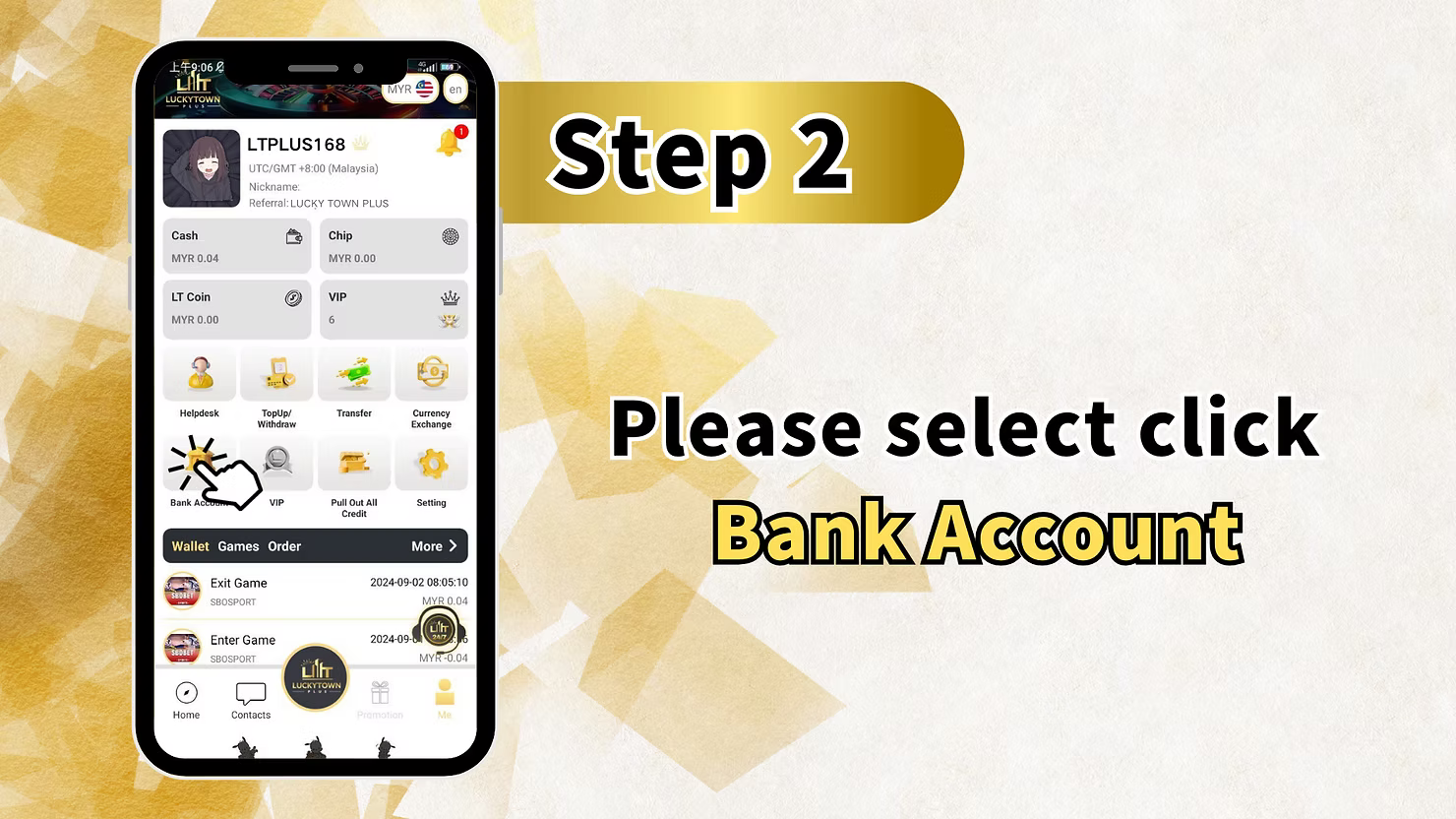
To begin your LUCKY TOWN PLUS add bank account process, log in to your account and locate the "ME" icon positioned at the bottom right corner of the main dashboard. Tapping this opens your personal account hub, where you can view your Cash balance, Chip balance, Games library, Info updates, Announcements, and critical financial settings.
Step 2: Select Bank Account from the Menu
Within the ME section, locate and click on "Bank Account" to proceed with your LUCKY TOWN PLUS add bank account process. This option takes you to the bank account management center where you can view existing accounts or add new ones for your profile.
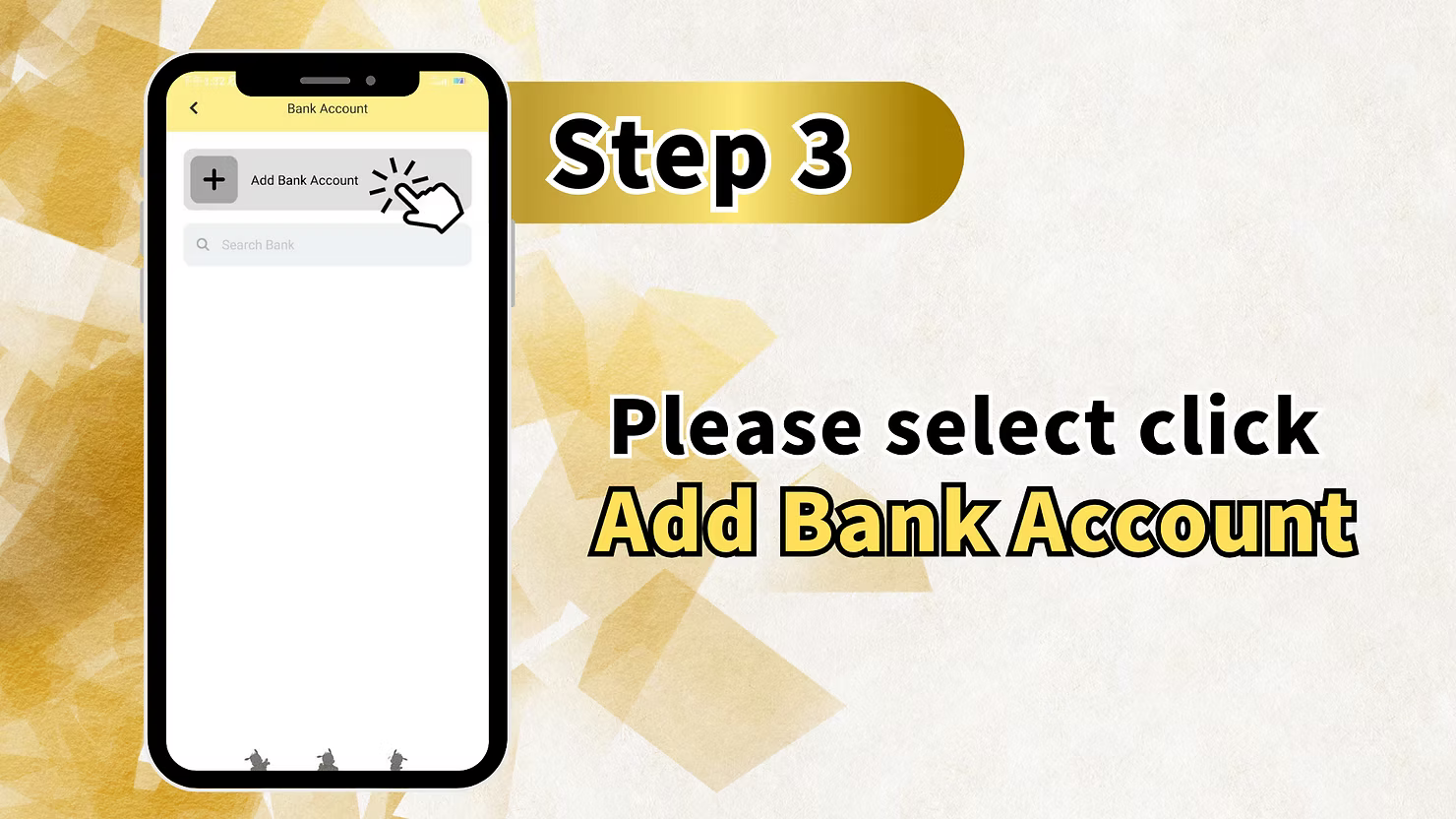
Step 3: Choose Add Bank Account
On the Bank Account screen, you will see an option to "Add Bank Account". The screen displays a search bar where you can search for your bank, but the primary action is to select "Add Bank Account" to begin entering your details for the LUCKY TOWN PLUS add bank account process.
Step 4: Fill in Bank Details
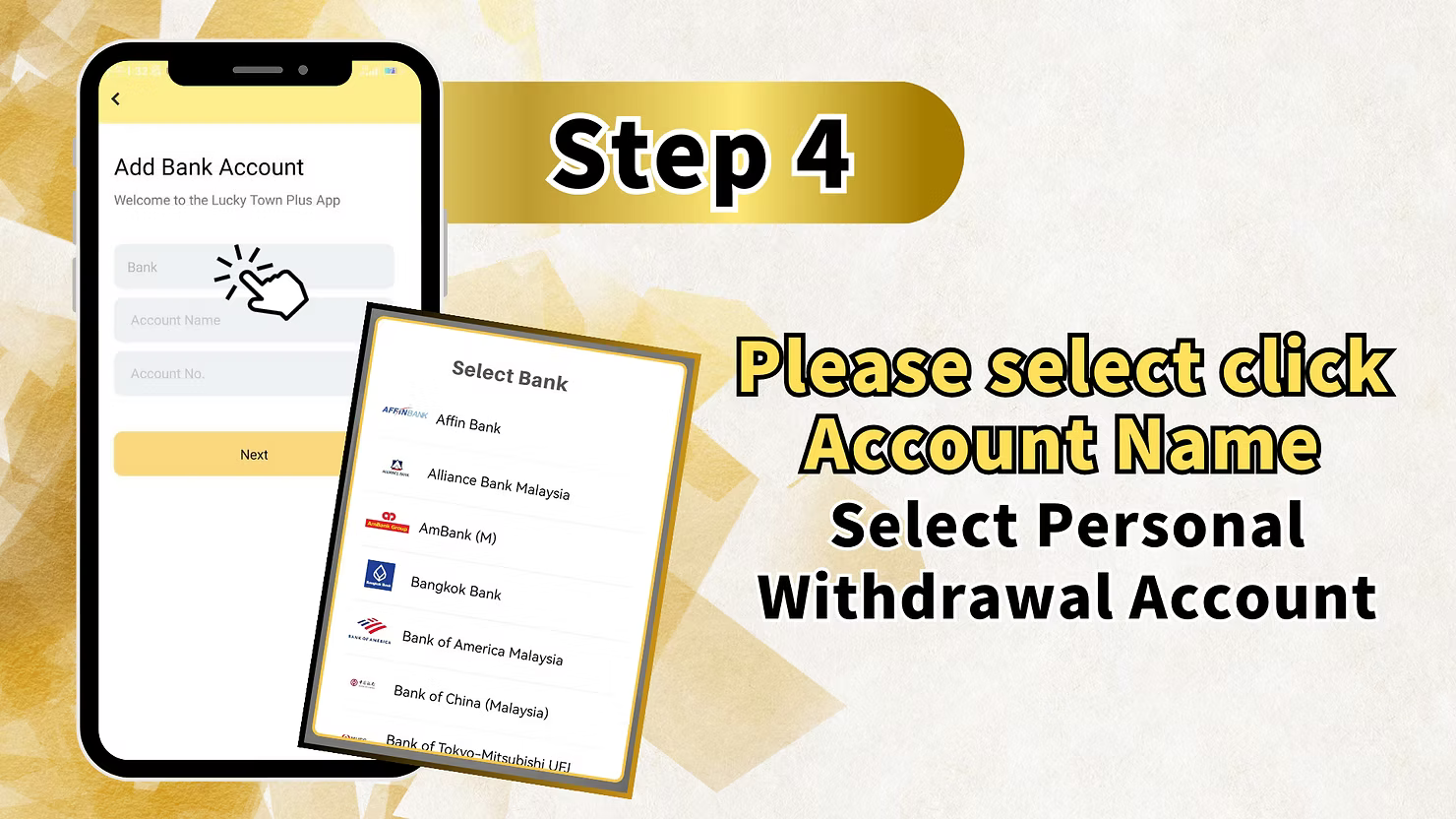
The Add Bank Account screen welcomes you with the Lucky Town Plus App branding and presents three essential fields: Bank, Account Name, and Account No. Below these fields, you will find a comprehensive list of Malaysian banks to choose from. Select your bank from the available options.
Available Banks at LUCKY TOWN PLUS
The platform supports a wide range of Malaysian financial institutions including: Affin Bank, Alliance Bank Malaysia, AmBank (M), Bangkok Bank, Bank of America Malaysia, Bank of China (Malaysia), Bank of Tokyo-Mitsubishi UFJ, and many more accessible through the search function. Select your bank from the list, then enter your account name and account number accurately.
Account Name Requirement
When adding your bank account, ensure the account name matches your LUCKY TOWN PLUS verified real name exactly. Select click Account Name and choose your Personal Withdrawal Account. Any discrepancy may result in withdrawal delays or rejections due to the fund safety policy.
Step 5: Review and Confirm Bank Details
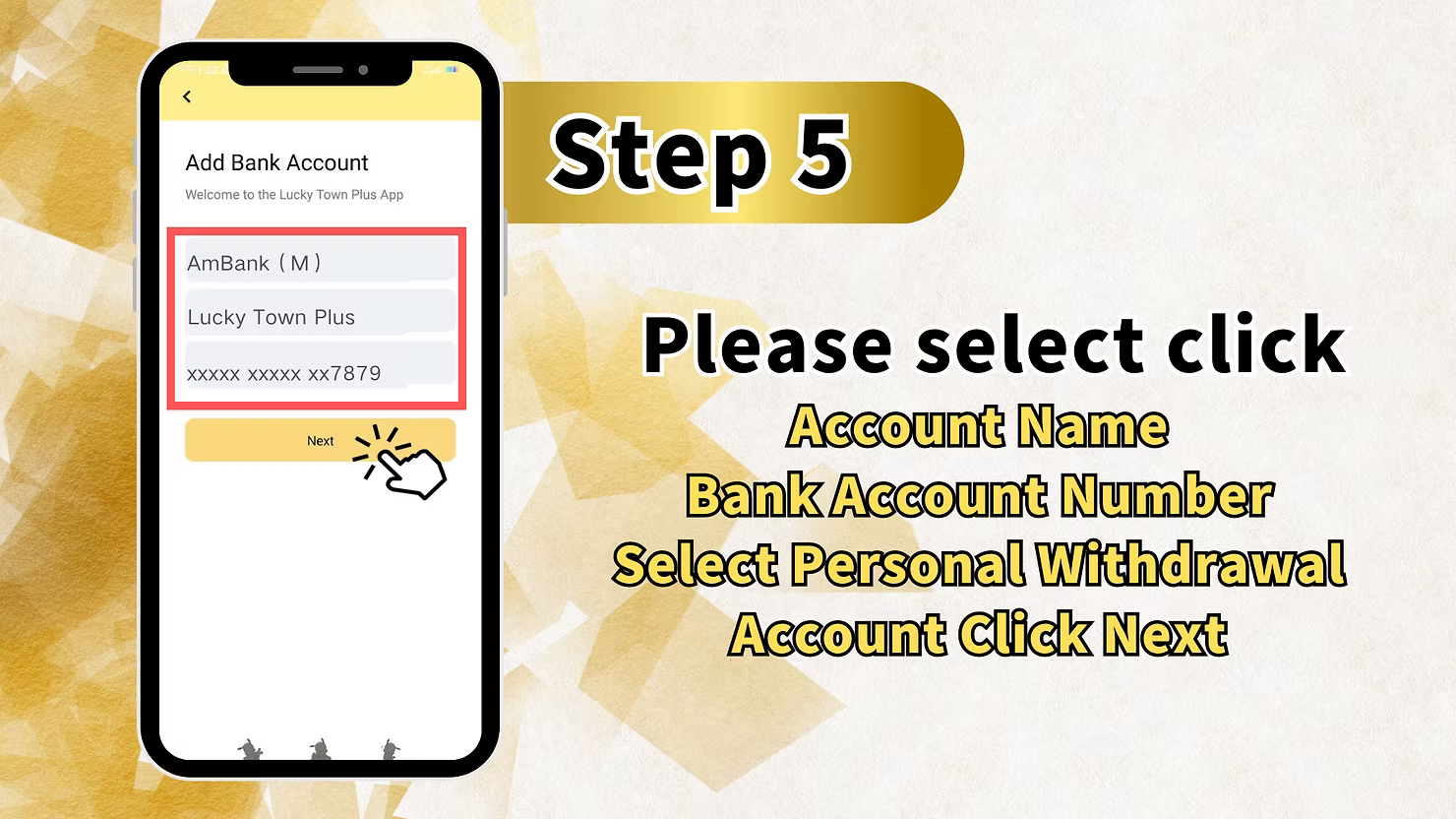
After entering your information, the screen will display your selected bank, your account name, and your account number with most digits masked for security, for example `xxxxxxxxxxxxxx7879`. Review all details carefully. Verify that your Bank Account Number is correct and confirm this is selected as your Personal Withdrawal Account. Click Next to proceed with your LUCKY TOWN PLUS add bank account request.
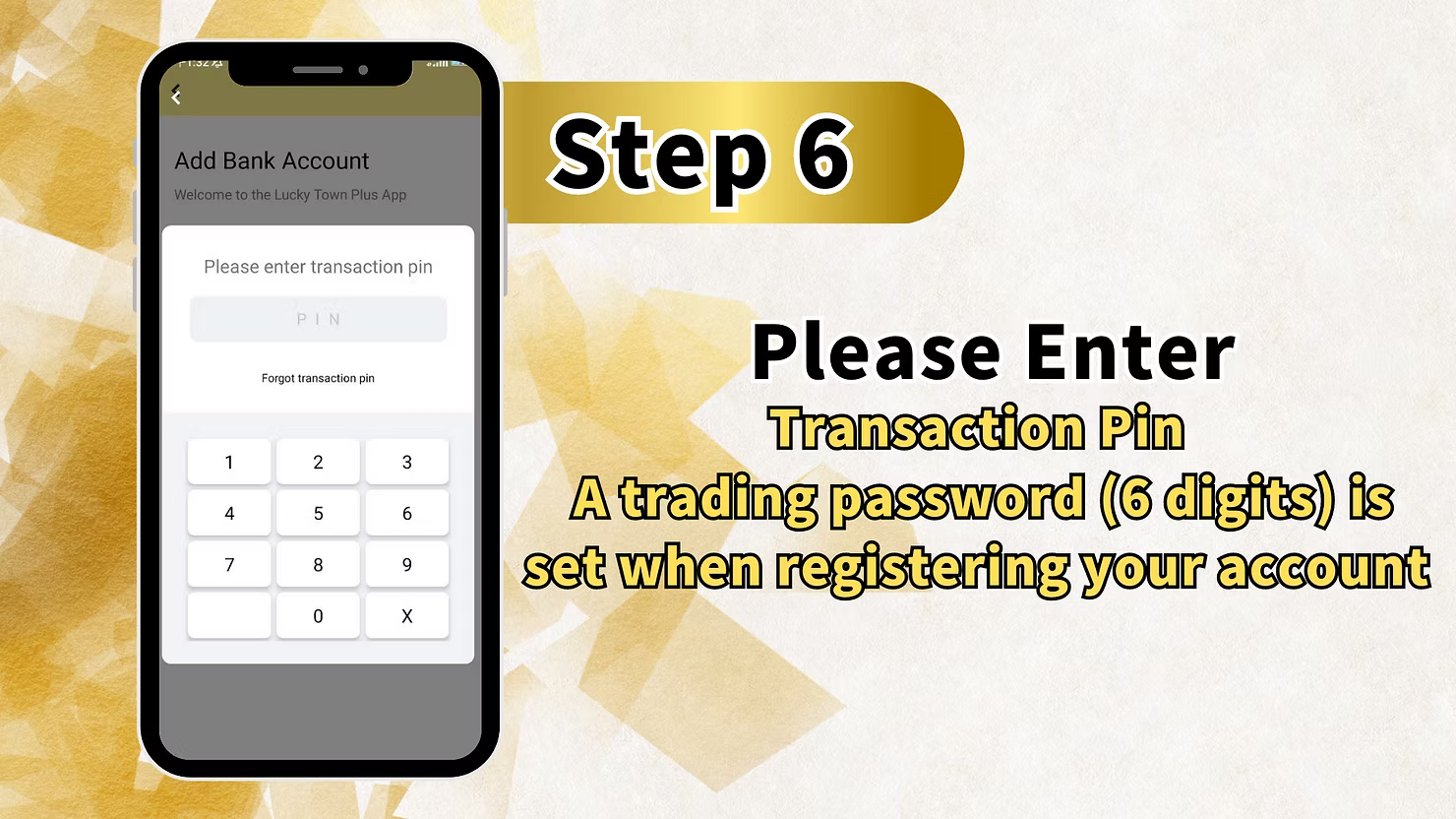
Step 6: Enter Transaction PIN for Security Verification
For security purposes, the final step requires you to enter your transaction PIN. The screen displays "Please enter transaction pin" with a numeric keypad (1 2 3, 4 5 6, 7 8 9, 0 X). Below the keypad, you will see a "Forgot transaction pin" link in case you need to reset it.
Important Transaction PIN Information
A trading password (6 digits) is set when registering your LUCKY TOWN PLUS account. This 6-digit PIN is required to authorize sensitive actions like adding bank accounts and making withdrawals. Enter your 6-digit transaction PIN using the keypad to complete your add bank account process. Never share this PIN with anyone.
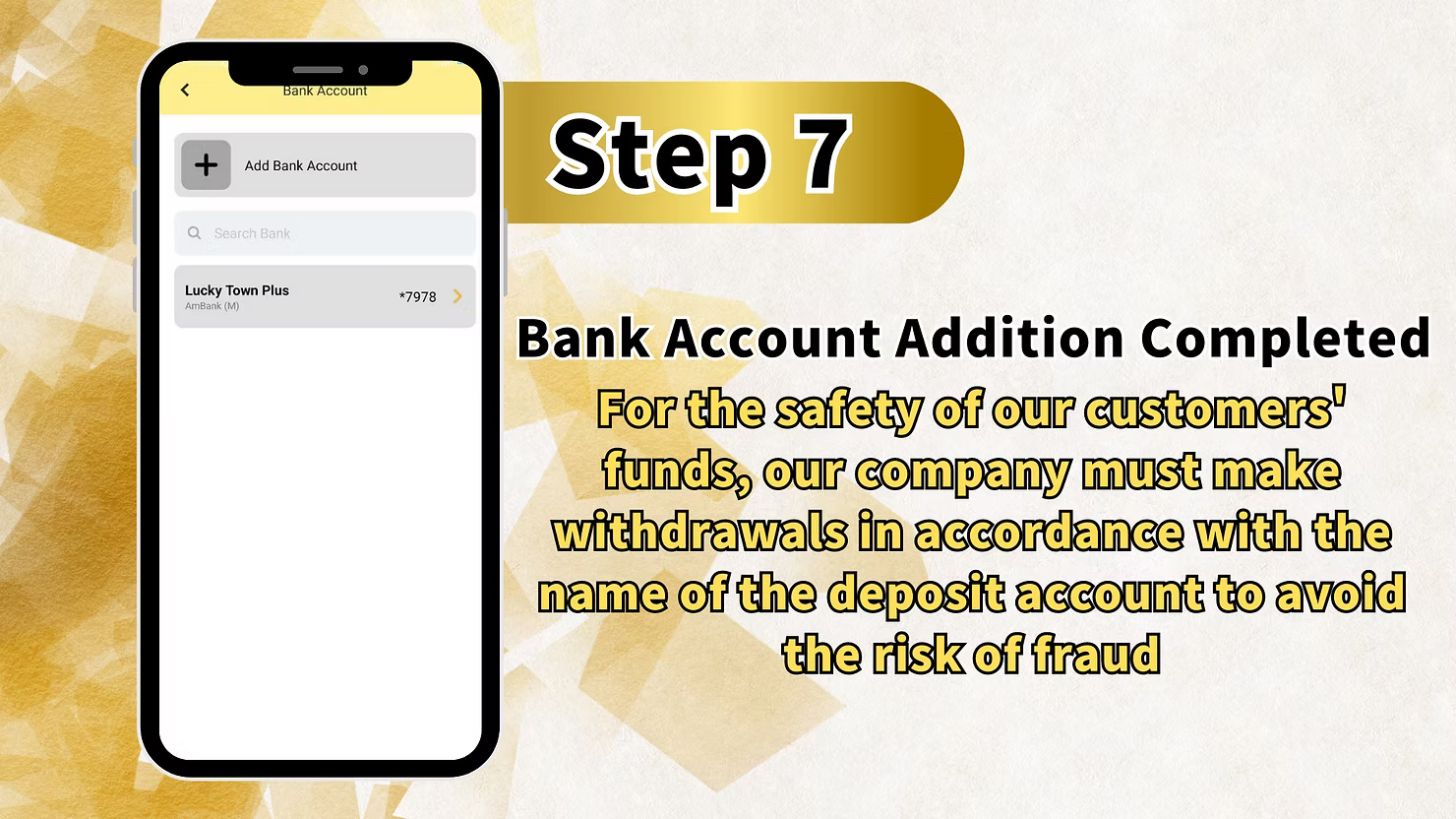
Step 7: Bank Account Addition Completed
After successfully entering your transaction PIN, you will see the confirmation screen: "Bank Account Addition Completed". This confirms that your bank account is now linked to your LUCKY TOWN PLUS profile and ready for withdrawals.
Important Security Notice for LUCKY TOWN PLUS Add Bank Account
Customer Fund Safety Policy
Upon completion of your LUCKY TOWN PLUS add bank account, you will see the following important notice: "For the safety of our customers' funds, our company must make withdrawals in accordance with the name of the deposit account to avoid the risk of fraud."
What This Policy Means for You
This policy means that withdrawals from your LUCKY TOWN PLUS account can only be made to bank accounts that match the name you used for deposits and verification. The name on your added bank account must exactly match your verified real name. This prevents unauthorized withdrawals and protects your funds from fraud.
Important Guidelines for LUCKY TOWN PLUS Add Bank Account
Name Matching Requirement
The account name you enter during LUCKY TOWN PLUS add bank account must exactly match your verified real name. Any discrepancy may result in withdrawal delays or rejections. This name matching policy is the foundation of fund security.
Transaction PIN Security
Your 6-digit transaction PIN is a critical security element for LUCKY TOWN PLUS add bank account and all financial transactions. Never share this PIN with anyone. If you forget your PIN, use the "Forgot transaction pin" link to reset it securely through the verification process.
Bank Selection Options
LUCKY TOWN PLUS add bank account supports a wide range of Malaysian banks including Affin Bank, Alliance Bank, AmBank, Bangkok Bank, Bank of America Malaysia, Bank of China (Malaysia), Bank of Tokyo-Mitsubishi UFJ, and many more accessible through the search function.
Account Number Accuracy
Double-check your account number when completing LUCKY TOWN PLUS add bank account. Incorrect account numbers can delay withdrawals or send funds to the wrong account. The masked display allows you to verify the last digits match your records while keeping your full account number secure.
Frequently Asked Questions About LUCKY TOWN PLUS Add Bank Account
Why do I need to add a bank account at LUCKY TOWN PLUS?
Adding a bank account at LUCKY TOWN PLUS is required for withdrawals. This links your gaming account to your personal bank account, enabling secure fund transfers when you request withdrawals. Without a linked bank account, you cannot withdraw funds.
What banks can I add to my LUCKY TOWN PLUS account?
LUCKY TOWN PLUS add bank account supports numerous Malaysian banks including Affin Bank, Alliance Bank Malaysia, AmBank (M), Bangkok Bank, Bank of America Malaysia, Bank of China (Malaysia), Bank of Tokyo-Mitsubishi UFJ, and many more accessible through the search function.
What information do I need to add a bank account?
To complete LUCKY TOWN PLUS add bank account, you need your bank name, account name which must match your verified real name, account number, and your 6-digit transaction PIN.
What is the transaction PIN and how do I get it?
The transaction PIN is a 6-digit trading password set when you register your LUCKY TOWN PLUS account. It is required for add bank account and all financial transactions. If forgotten, click "Forgot transaction pin" to reset through the verification process.
How do I know my bank account addition was successful?
After completing all steps and entering your transaction PIN, you will see a confirmation screen stating "Bank Account Addition Completed". This confirms your LUCKY TOWN PLUS add bank account process is successful.
Can I add multiple bank accounts to my LUCKY TOWN PLUS profile?
Yes, the interface allows you to add multiple bank accounts. You can then select your preferred Personal Withdrawal Account during transactions. This flexibility allows you to manage different accounts for different purposes.
Is my bank information secure at LUCKY TOWN PLUS?
Yes. LUCKY TOWN PLUS implements strict security measures including transaction PIN requirements, masked account number displays, and the name matching policy. The fund safety policy ensures withdrawals only go to accounts matching your verified name, preventing unauthorized transfers.
Why Complete LUCKY TOWN PLUS Add Bank Account
Enable Withdrawals
The primary reason to complete LUCKY TOWN PLUS add bank account is to enable withdrawals. Without a linked bank account, you cannot withdraw funds from your account to enjoy your winnings.
Fund Security Protection
The name matching policy ensures that only you can withdraw funds to your personal bank account. This LUCKY TOWN PLUS add bank account security feature prevents unauthorized access to your winnings and protects your hard-earned funds.
Compliance with Financial Regulations
Adding a bank account helps LUCKY TOWN PLUS comply with financial regulations and anti-fraud measures, creating a safer environment for all members while ensuring legal compliance.
Streamlined Future Transactions
Once you complete LUCKY TOWN PLUS add bank account, future withdrawals become faster since your bank details are already stored and verified. No need to re-enter information for each withdrawal request.
Peace of Mind
Knowing your bank account is properly linked and protected by transaction PIN and name matching policies provides peace of mind that your funds are secure and will reach the right account when you withdraw.
Start Your LUCKY TOWN PLUS Add Bank Account Process Today
Essential Step for Withdrawals and Fund Security
The LUCKY TOWN PLUS add bank account feature is a critical component of the platform's financial infrastructure, ensuring that members can securely withdraw their winnings to personal bank accounts. This seven-step teaching guide transforms what might seem like a daunting process into a straightforward, manageable procedure that any member can follow with confidence. Starting from the ME button at the bottom right of the main page, the journey to a linked bank account is clearly mapped: ME, Bank Account, Add Bank Account, bank selection and detail entry, review and confirm, transaction PIN entry, and completion confirmation.
Comprehensive Bank Selection for Malaysian Members
The extensive bank selection list includes major Malaysian financial institutions: Affin Bank, Alliance Bank Malaysia, AmBank (M), Bangkok Bank, Bank of America Malaysia, Bank of China (Malaysia), Bank of Tokyo-Mitsubishi UFJ, and many more accessible via the search function. This extensive coverage ensures most members can add their existing bank accounts without needing to open new accounts elsewhere. The three essential fields, Bank, Account Name, and Account No., capture all information needed for secure transfers.
Name Matching Policy and Account Verification
The account name field is particularly critical: it must exactly match your LUCKY TOWN PLUS real-name verification to comply with the fund safety policy. Any discrepancy can delay withdrawals or trigger additional verification requirements. The masked account number display provides security while allowing you to verify the last digits match your records. This partial visibility helps confirm you've entered the correct account without exposing your full number.
Transaction PIN Security and Fund Protection
The transaction PIN step adds an essential security layer. This 6-digit PIN, established during account registration, ensures that only you can authorize sensitive actions like adding bank accounts. The numeric keypad interface is simple and secure, with a "Forgot transaction pin" link available if needed. The final confirmation screen, "Bank Account Addition Completed", provides positive feedback that the process succeeded. Immediately following this, the important fund safety notice reinforces why name matching matters and how it protects you.
Two-Factor Security for Your Peace of Mind
The policy that withdrawals must match deposit account names is a critical fraud prevention measure. If someone gained unauthorized access to your LUCKY TOWN PLUS account, they could not withdraw to their own bank account because the names would not match. The transaction PIN requirement adds another layer: even if someone had your login credentials, they would need your 6-digit PIN to add a new bank account or process withdrawals. This two-factor approach significantly enhances security for all members.
Your Gateway to Secure Withdrawals at LUCKY TOWN PLUS
For members who may have forgotten their transaction PIN, the "Forgot transaction pin" link provides a recovery path. This ensures you're not permanently locked out if you forget your PIN, while maintaining security through the recovery process. The ability to add multiple bank accounts gives flexibility, you might add both a personal savings account and a joint account, then select your preferred withdrawal method for each transaction. Complete your LUCKY TOWN PLUS add bank account today to enable withdrawals and enjoy the full financial functionality of your membership. Whether you're ready to cash out winnings from 4D LOTTERY, PRAGMATIC PLAY slots, LIVE CASINO games, or SPORTS betting through IBCBET and SBOBET, having your bank account properly linked ensures smooth, secure transactions.
Complete Your LUCKY TOWN PLUS Add Bank Account Today
Follow our seven-step teaching guide to link your bank account to LUCKY TOWN PLUS. Select from Affin Bank, Alliance Bank, AmBank, and more. Transaction PIN required for verification. Essential for secure withdrawals.
Add Bank Account Now